


Refurbished Commercial Copiers: 2026 UK Business Guide
The refurbished label alone won’t tell you whether a copier can keep pace with your working day. Before choosing refurbished commercial copiers, check the condition of the specific machine and how well it fits the way your business prints, scans and copies.
It’s reasonable to have questions about a copier’s history, reliability and support. A machine that looks suitable on paper may not match your print volumes or daily workflow, and warranty terms can vary. Ask for clear answers before you decide.
This guide covers what to check, from condition and expected workload to servicing arrangements and warranty cover. It also suggests practical questions to ask a supplier, including whether a 12 month warranty applies to the specific copier and what support is available after purchase. A Four Business Equipment Ltd has supplied office equipment since 1988. A useful buying conversation should focus on your needs as well as the machine, so you know what to expect after purchase.
Table of Contents
What makes refurbished commercial copiers worth considering for a business?
How to assess the condition of refurbished commercial copiers
How to compare refurbished copiers for your office requirements
What to confirm before ordering a refurbished commercial copier
Explore refurbished commercial copiers with A Four Business Equipment Ltd
What makes refurbished commercial copiers worth considering for a business?
A copier can be central to the working day, handling everything from staff handouts and signed forms to scanned documents. Refurbished commercial copiers may suit a business looking for practical document equipment, but the label alone doesn’t show whether a particular machine is right for your office.
Start with the work it needs to do. Consider who will use it, what you print, copy and scan, and how those tasks fit into your everyday workflow. A machine that meets those needs, with clear information about its condition and available support, is a more considered choice than one selected on description alone. For a brief introduction to how the technology developed, see this overview of the history of photocopiers.
How is a refurbished copier different from a used copier?
Suppliers may use “used” and “refurbished” differently, so don’t rely on the wording to explain what has happened to a machine. A new copier hasn’t previously been used in a working office. A used copier has had a previous working life, while “refurbished” often suggests it has had some preparation before resale. Don’t assume there is a single process behind the term.
Ask about the individual machine. Find out its age and usage history, current condition, known limitations, and what inspection, repairs or testing have actually been carried out. Request clear answers in writing so you can assess the equipment rather than rely on a broad label.
Which businesses might consider a refurbished copier?
A refurbished copier may be worth considering if your office needs commercial equipment for regular tasks such as printing internal documents, copying paperwork or scanning records. The right fit depends on how many people will use it, how documents move through your office, and which functions your team genuinely needs.
Before making an enquiry, map out a typical working day. Note whether staff mainly print and copy, or regularly scan documents as part of a process. Share those needs with the supplier and ask how the specific machine fits. If your workflow depends on a function you haven’t confirmed, don’t assume it’s included. Include condition and ongoing photocopier service in your decision, not just the initial specification.
How to assess the condition of refurbished commercial copiers
A clear description is a useful starting point, but it can’t tell you everything. Ask specific questions about the machine’s history and current condition, then check how it handles the tasks your team needs. The aim isn’t to assume every refurbished copier has been through the same process. It’s to understand what is known about the individual machine and what still needs confirming.
What should you ask about the machine’s history?
Start with the basics. Ask how old the copier is, what information is available about its previous use, and whether maintenance records can be shared. Then clarify what the supplier knows about repairs or replaced parts. If information isn’t available, ask them to say so clearly rather than leaving you to guess.
Next, ask about faults, restrictions or features that need attention. Is there a function that doesn’t work as expected, for example, or a limitation that could affect your daily tasks? Write down the answers, including anything the supplier needs to check. An unanswered question isn’t automatically a reason to walk away, but resolve it before committing.
How can you check everyday performance?
If a demonstration is available, bring examples of the documents your team regularly handles. Try a typical print, copy and scan task, and check that the controls make sense for the people who will use the machine. Look at the output, see how paper is loaded and collected, and test any functions your workflow depends on.
Ask the supplier to explain how the copier performs under your expected use, including any stated limits. A demonstration can show you what the machine does, but it won’t answer every question about its history or future servicing. Confirm those separately.
Before deciding, compare the supplier’s answers with your written list of needs. Mark each point as confirmed, unclear or not applicable. If the machine’s condition, history or performance hasn’t been explained clearly, ask for more detail. You can also review photocopier options from A Four Business Equipment Ltd and ask what information is available about a specific machine.
How to compare refurbished copiers for your office requirements
Compare each machine with the work your team actually does, not a list of features you may never use. Note how many people are likely to use it, which documents they handle, and how printing, copying and scanning fit into the office routine. Then ask the supplier to confirm whether each shortlisted copier can meet those requirements.
Which functions does your team actually need?
List regular tasks first, then separate essential functions from occasional ones. Staff might routinely print and copy paperwork but only scan documents from time to time, for example. If you also need faxing, check that it’s included on the specific machine rather than assuming it is. An AIO combines printing, scanning, copying and faxing in one device, but that doesn’t mean every AIO has the exact functions or setup your business requires.
Confirm any required mobile functionality or document features directly with the supplier. Describe how staff would use them and ask whether the machine supports that workflow. Don’t rely on a general model description if the exact refurbished unit hasn’t been confirmed.
How should warranty and servicing affect your comparison?
Ask what the warranty covers, how to make a claim and which exclusions apply. If a 12 month warranty is mentioned, confirm in writing whether it covers the specific refurbished machine and ask for its terms. Treat any unconfirmed cover as something to resolve before choosing.
Also ask what photocopier servicing is available for the machine and how to obtain compatible toner and paper. A supplier may offer these items, but confirm that they suit the copier you’re considering and are available under the arrangements discussed.
A comparison sheet can help keep the answers clear. Make one copy for each machine and fill in the details supplied:
Condition: age, usage history, known faults or limitations, and information about work already carried out.
Functions: confirmed printing, copying, scanning, faxing and any other functions your team needs.
Warranty: confirmed cover, claim process, exclusions and applicable term.
Servicing: what support is available for that specific copier and how to request it.
Supplies: whether compatible toner and paper can be obtained, and any relevant details.
Compare the completed sheets with your essential requirements. If an answer is missing or unclear, ask the supplier to confirm it before deciding. This helps you choose refurbished commercial copiers based on suitability and support, rather than assumptions about a model or its features.
What to confirm before ordering a refurbished commercial copier
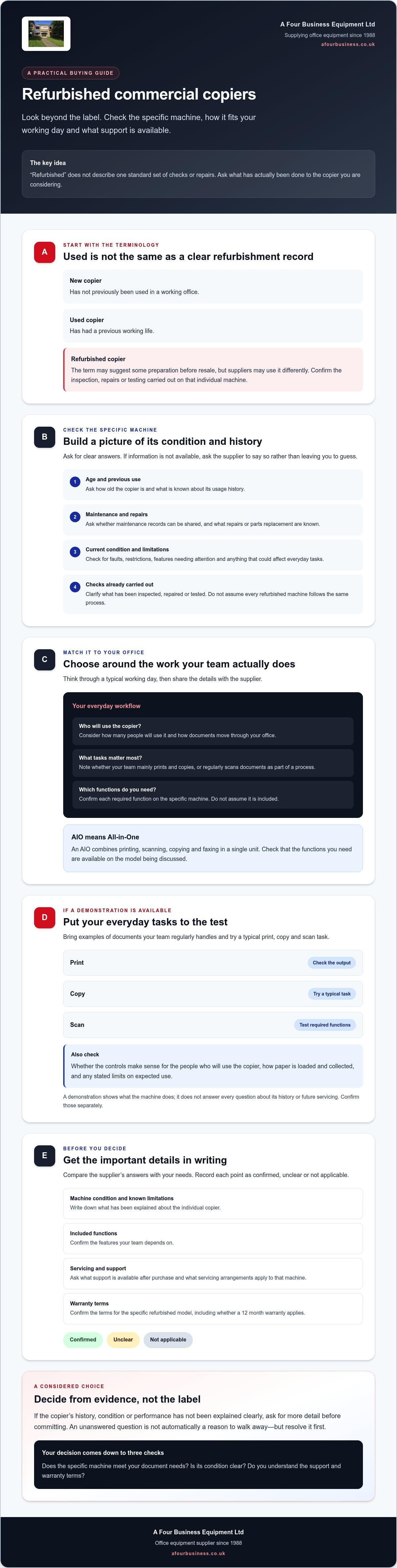
Before placing an order, bring the details together in writing. A clear record helps you check that the machine, its functions and the arrangements around it match your office’s needs. It also gives you a reference if you need to follow up with the supplier.
What should a refurbished copier checklist include?
Start with your team’s intended tasks, expected users and required functions. Then record what the supplier has confirmed about the specific machine. Keep uncertain points visible rather than treating silence as agreement.
Office needs: regular print, copy and scan tasks, who will use the device, and any workflow requirements.
Machine condition: age, known usage history, current condition, repairs or replaced parts if known, and any stated limitations.
Included functions: the tasks and features confirmed for this particular copier, including any functions your team relies on.
Warranty: what is covered, how claims are handled, exclusions, and whether a 12 month warranty applies to this refurbished machine.
Ongoing arrangements: what servicing is available, who to contact with operational questions, and how to obtain compatible toner and paper.
Ask for unclear answers to be confirmed before you commit. If an essential function, warranty condition or machine limitation is still uncertain, pause and resolve it with the supplier. A written checklist makes it easier to distinguish confirmed details from questions still awaiting an answer.
How can you prepare your office for the device?
Decide where the copier will be used and which staff need access. Then ask the supplier whether delivery and installation are available for the specific refurbished machine, what each involves, and what preparation is needed at your premises. Don’t assume these arrangements are included. Agree the details in advance.
Plan the everyday handover too. Identify who will raise questions or request photocopier servicing, and how your office will obtain toner and paper for the selected machine. If several people use the copier, make sure they know where to find operating guidance and whom to contact when a routine issue arises. Confirm setup or access requirements with the supplier before the agreed delivery date.
These steps give you a clear record of what you’re ordering and what support to expect. To discuss your requirements and ask about available photocopiers, contact A Four Business Equipment Ltd.
Explore refurbished commercial copiers with A Four Business Equipment Ltd
A Four Business Equipment Ltd supplies new multifunctional copiers and high-quality used photocopiers for commercial environments. The company has operated since 1988. If you’re considering a particular machine, use your checklist to guide a practical conversation. Focus on whether available equipment suits your team’s document tasks and what the supplier can confirm about its condition and support.
What can you ask the supplier before choosing?
Ask which machines are currently available, then request condition information for any option that may fit your requirements. Check that the functions your team needs are present, and ask the supplier to explain any limitations clearly. This helps you assess the individual copier based on available information rather than a general description.
Before relying on warranty cover, confirm the terms for the specific refurbished machine. You can also discuss photocopier servicing, toner and paper to understand what support and supplies may be available after purchase.
How do you take the next step?
Prepare a short outline of your office needs, including who will use the copier and the print, copy and scan tasks involved. Share any essential functions or workflow requirements, then ask A Four Business Equipment Ltd which available used photocopiers may suit and what information or support can be confirmed for each one.
For repair estimates, the company states there is no call out charge. Ask about the repair estimate you need and confirm the arrangements directly.
Ask A Four Business Equipment Ltd about photocopiers and discuss which details to check before choosing.
Take the next step with confidence
Your copier choice should make sense for the way your team works, with clear terms you can refer back to. Use the questions in this guide to check any details that still need confirming before you decide.
A Four Business Equipment Ltd has supplied office equipment since 1988 and also offers photocopier servicing, toner and paper. The company lists a 12 month warranty, so confirm whether it applies to the refurbished machine you’re considering and ask about the terms. There is no call out charge for repair estimates.
Ready to discuss your requirements? Ask A Four Business Equipment Ltd about available photocopiers and the support available for a specific machine.
Frequently Asked Questions
What is a refurbished commercial copier?
A refurbished commercial copier is a previously used office machine that a seller describes as having been prepared or restored for resale. The term doesn’t guarantee a particular set of checks or repairs, and suppliers may use “refurbished” differently from “used”. Ask what work, if any, has been done to the specific copier, and request details of its age, history, current condition and known limitations before deciding.
Are refurbished commercial copiers reliable?
Reliability depends on the individual copier’s condition, its suitability for your workload and the support available. The refurbished label alone can’t tell you how it will perform. Ask for information about previous use, maintenance and known faults. If possible, see a demonstration of the print, copy and scan tasks your office relies on. Before ordering, get clear answers about servicing and any warranty that applies to that machine.
What should I check before buying a refurbished copier?
Check the copier’s age, usage history, current condition, known repairs and any stated limitations. Confirm that its functions match your staff’s routine tasks, then ask for a demonstration or an explanation of how it handles your typical documents. Get warranty terms, servicing arrangements, compatible toner and paper details, and any delivery and installation arrangements confirmed. Keep a written record and resolve unanswered questions before placing your order.
Do refurbished copiers come with a warranty?
Warranty cover depends on the supplier and the specific refurbished machine, so ask before relying on it. A Four Business Equipment Ltd lists a 12 month warranty, but confirm whether it applies to the refurbished copier you’re considering. Ask what is covered, how to make a claim, and which conditions or exclusions apply. Request the terms in writing so you know what support to expect if a fault arises.
Can a refurbished copier handle a busy office?
It may be suitable, but check the particular copier against your office’s workload. Describe how many people will use it, what they print, copy and scan, and how those tasks fit into a typical working day. Ask the supplier whether the machine can meet those needs and whether it has any relevant performance limits. Don’t assume capacity or suitability from its age or model description alone.
Can I get servicing and toner for a refurbished copier?
A Four Business Equipment Ltd supplies photocopier service, toner and paper, but check that servicing and compatible supplies are available for the specific refurbished copier you’re considering. Ask who to contact about routine operational questions and how to request service if the machine needs attention. Confirm toner and paper compatibility before ordering, along with any arrangements that affect access to these supplies after purchase.
Is delivery and installation available for refurbished photocopiers?
Availability and terms should be confirmed with the supplier for the specific machine, as arrangements can vary. Ask whether delivery and installation are offered, what each includes, and whether you need to prepare anything at your premises. Confirm the arrangements before placing your order. A clear answer helps you plan where the copier will go and how your team will start using it.



Comments