


Office Photocopier Security: A Guide for UK Businesses
Did you know that 67% of organisations experienced a print-related data breach in 2024, according to a report by Quocirca? It's a startling figure that highlights a common blind spot in many UK workplaces. Most of us see a multifunctional photocopier as a simple piece of office kit, but in reality, it's a sophisticated computer connected directly to your network. We understand that technical jargon like AES-256 encryption or TLS protocols can feel overwhelming. You might also worry about what lingers on an old hard drive once a machine is retired. These concerns are valid and shared by many of the local businesses we've supported since 1988.
This guide will help you move past the confusion and gain total peace of mind. You'll discover how to protect your sensitive data by understanding and implementing the latest office copier security features. We've stripped away the complexity to provide a clear look at essential security hardware and a practical checklist for your current or future machines. By the end, you'll know exactly how to keep your documents confidential and ensure your fleet meets the standards of the Data (Use and Access) Act 2025. We're here to act as a steady hand, helping you secure your office without the stress.
Table of Contents
Why Office Copier Security Features are Vital in 2026
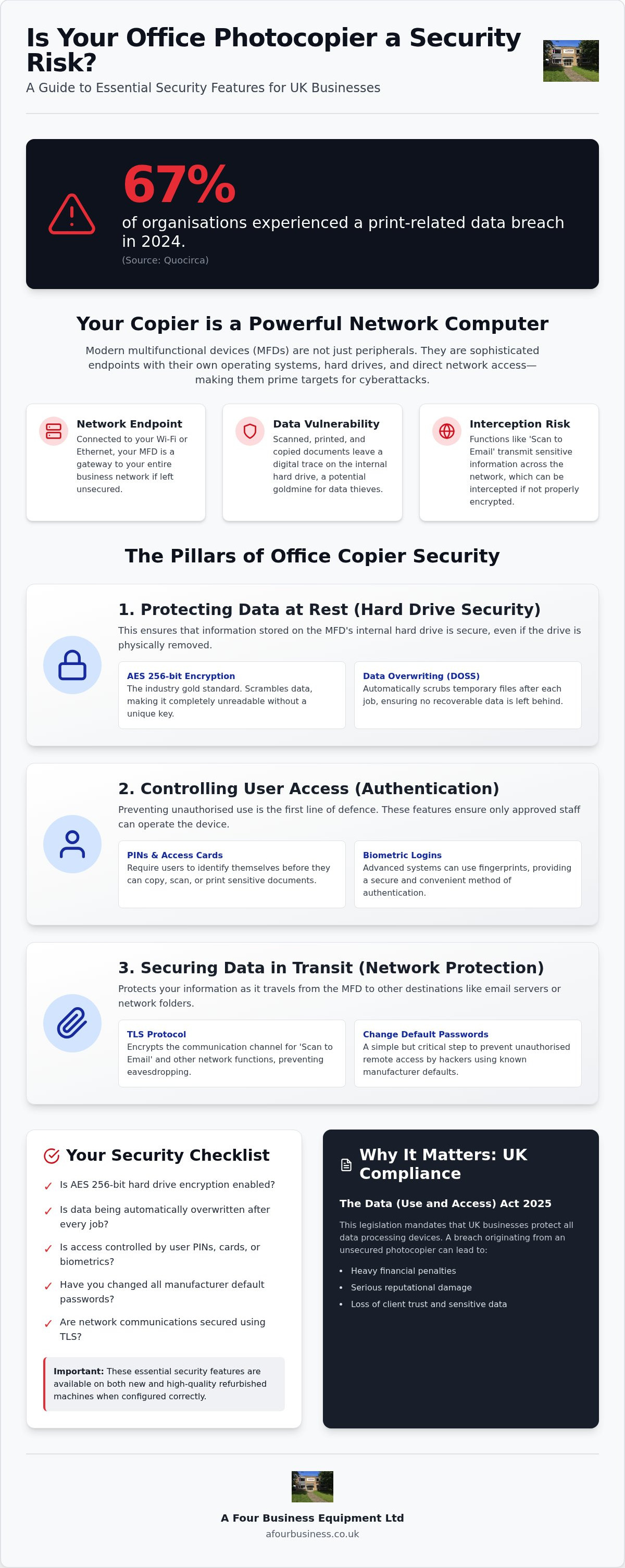
The days of the simple, isolated analogue photocopier are long gone. Today's multifunctional devices (MFDs) are powerful computers that sit at the heart of your office network. While they offer incredible efficiency, they also create a significant digital footprint. Every document you scan, copy, or print leaves a trace. Failing to prioritise office copier security features can leave your business vulnerable to more than just a paper jam. It's a risk that many local firms overlook until it's too late.
In 2026, the legal stakes are higher than ever for UK businesses. With the Data (Use and Access) Act 2025 now in full force, any data breach, even one originating from a photocopier, carries heavy penalties and serious reputational damage. Treating your copier as a 'dumb' peripheral is a dangerous oversight. It's a gateway. If a hacker gains access to the machine, they often gain a foothold in your entire network, bypass firewalls, and access sensitive client files.
The Multifunctional Device (MFD) as a Network Endpoint
Your office copier is essentially a server with a glass top. It has its own operating system, a powerful processor, and a high-capacity hard drive. Because it's connected to your Wi-Fi or Ethernet, it's a network endpoint. Hackers specifically look for these often overlooked devices. Many businesses leave manufacturer default passwords unchanged, making it easy for intruders to gain remote access. Relying on 'security through obscurity' isn't a strategy. Just because your copier isn't a desktop PC doesn't mean it isn't being targeted by sophisticated scripts.
Data Risks: Scanned, Printed, and Stored Information
Where does your data go once you press 'start'? When you scan a sensitive contract to an email or a shared folder, that file travels across your network. Without encryption, that data is ripe for interception. Even more concerning is the issue of data remanence on hard drives. Most machines store a digital image of every job processed on their internal drive. If that drive isn't protected, those images stay there long after the paper has been filed away.
Physical theft of documents from the output tray is a known risk, but digital interception is often invisible. Your 'Scan to Email' function could be a leaky pipe if not properly configured. Modern office copier security features are designed to seal these gaps. They ensure that once a job is finished, the data is either encrypted or completely overwritten. We've spent over 35 years helping businesses understand these risks, ensuring that their hardware isn't the weakest link in their security chain.
Essential Data Security: Hard Drive Encryption and Overwriting
Every time you scan a document or print a report, your multifunctional device creates a digital image of that file on its internal hard drive. This storage is vital for performance, but it creates a vulnerability if left unprotected. Modern office copier security features address this by ensuring that your data isn't just sitting there in plain text. Without these protections, anyone with physical access to the hard drive could potentially recover sensitive information.
Data sanitisation is the process of permanently removing data traces to ensure information cannot be recovered. This is a core pillar of our service at A Four Business Equipment. Whether you're looking at brand-new models or our high-quality used photocopiers, ensuring these machines are correctly configured is the first step toward true document confidentiality.
Encryption: Protecting Data at Rest
Encryption acts as a digital vault for your information. The current industry gold standard is AES 256-bit encryption. It scrambles the data stored on the drive, making it completely unreadable without the correct decryption key. Even if the hard drive were physically removed from the machine, the contents would remain a jumbled mess of code. Hardware-level encryption is generally preferred over software-only versions because it doesn't slow down the machine's performance whilst providing a higher level of security. It's essential to ensure this feature is active from the moment of installation, as it protects your data 'at rest' throughout the machine's lifecycle.
Automatic Data Overwriting and Scrubbing
Whilst encryption hides data, overwriting removes it. A Data Overwrite Security System (DOSS) works by scrubbing the temporary data left behind after a job is completed. This practice is highlighted in the FTC guide to digital copier security as a vital step in preventing data recovery. Most modern machines offer several levels of scrubbing:
Single-pass overwriting: This replaces data once with random characters, which is suitable for most standard office environments.
Multi-pass overwriting: This replaces the data three or more times, meeting much higher security standards for sensitive sectors.
We take this particularly seriously during the 'End-of-Lease' phase. Before any of our refurbished hardware finds a new home, it undergoes a rigorous data wipe to meet professional standards. This ensures every trace of the previous owner's information is gone. It's a level of care we've maintained since 1988, giving our clients the confidence that their old data won't come back to haunt them.
Access Control and User Authentication Features
One of the simplest yet most effective office copier security features is controlling who can actually walk up and use the device. In many UK offices, a multifunctional machine sits in a corridor, accessible to anyone from staff to delivery drivers. This unrestricted access is a major security loophole. If your machine doesn't require a login, anyone can scan a document to an external email address or print sensitive files that might sit in the output tray for hours. Since 1988, we've seen how often "document abandonment" leads to accidental data leaks; where a confidential payroll report or client contract is left for anyone to see.
Modern authentication methods have moved far beyond simple PINs, which staff often forget or share. Today, we can integrate your machine with existing office ID badges or RFID fobs. This means a quick tap is all it takes to unlock the machine's functions. For even higher security, biometric logins like fingerprint scanning are now available on professional-grade models. These tools don't just stop unauthorised use; they create an audit trail. You'll be able to see exactly who printed what and when, providing total accountability for your document workflow.
Implementing Secure Release and Pull Printing
Pull Printing, sometimes known as Follow-Me Printing, is a brilliant solution for busy workplaces. Instead of a document printing the moment you click 'print' at your desk, the job is held in a secure encrypted queue. It only prints when you are physically standing at the machine and authenticate yourself. This ensures that sensitive documents never sit unattended in the tray. It also significantly reduces paper waste, as jobs that aren't needed simply expire in the queue rather than being printed and binned. Following the NCSC device security guidance helps ensure that every piece of hardware on your network, including your multifunctional device, adheres to a robust security policy that protects against both internal and external threats.
Role-Based Access Control (RBAC)
Not every member of staff needs access to every function of your machine. With Role-Based Access Control, you can customise permissions based on job requirements. For example, you might allow guest users to copy documents whilst disabling their ability to 'Scan to USB' or access the network address book. This granular control is vital for preventing data from leaving the building on a thumb drive. We always advise our clients that the most critical first step is changing the manufacturer's default admin password immediately upon delivery. It's a small task that prevents a huge range of common remote exploits. Our maintenance contracts include regular oversight of these settings, ensuring your firmware and access protocols stay current as your team grows.
Network Protection and Secure Communication Protocols
Whilst earlier sections focused on protecting data "at rest" on the hard drive, we must also consider data "in motion". Every time you send a print job from your PC or scan a document to a network folder, that information travels through your office "pipes". If these pipes aren't sealed, a sophisticated intruder could intercept your sensitive files as they move across the network. Modern office copier security features are designed to encrypt this traffic, ensuring that even if data is intercepted, it remains completely unreadable to anyone without the proper authorisation.
Securing the network also means reducing the "attack surface" of your machine. Many multifunctional devices come with various ports and protocols enabled by default, such as FTP or Telnet, which are rarely needed in a modern office. These are essentially open windows that hackers can use to gain entry. We recommend a "least privilege" approach: disabling every protocol that isn't essential for your daily operations. By tightening these settings, you turn your copier from a potential vulnerability into a secure, hardened network endpoint.
Encrypted Communication and IP Filtering
The primary tool for securing data transmission is Transport Layer Security (TLS). This protocol ensures that the link between your computer and the multifunctional device is private and secure. When TLS is correctly configured with valid certificates, your scanned documents and print jobs are shielded from prying eyes. Beyond encryption, you can use IP and MAC address filtering to tell the copier exactly which devices it's allowed to talk to. This means that even if an unauthorised laptop is plugged into your office network, the copier will simply ignore any requests from it. Firewalls built into the machine provide an additional layer of defence, preventing external access from the wider internet and keeping your document workflow strictly internal.
Firmware Management and Security Patching
Outdated firmware is perhaps the single biggest cause of printer-based security breaches. Think of firmware as the machine's operating system; just like Windows or macOS, it needs regular updates to patch newly discovered vulnerabilities. Many businesses struggle to keep up with these updates, often because they don't have a dedicated IT team to monitor every peripheral. This is where the human element becomes vital. You don't need to be a cybersecurity expert to maintain a safe office. Our photocopier service contracts take this burden off your shoulders by providing professional oversight and ensuring your machines are always running the latest, most secure firmware version.
Modern professional machines are even beginning to incorporate self-healing technology. These devices can detect unauthorised changes to their BIOS or settings and automatically alert administrators or reset themselves to a known secure state. It's a proactive level of protection that provides true peace of mind. Since 1988, we've focused on providing this kind of ethical, no-nonsense guidance, ensuring that your technology supports your business success rather than creating a hidden risk.
Securing Your Fleet: New vs. Refurbished Office Photocopiers
Many UK business owners feel pressured to invest in brand-new hardware simply because they fear older models lack modern protection. This is a common myth. Whilst cutting-edge machines often lead the way, high-quality refurbished models can be just as secure when they are professionally prepared. The difference comes down to the expertise of the supplier. We've spent over 35 years identifying reliable hardware and ensuring it meets the stringent demands of the modern office. A machine is only as safe as its configuration; a poorly set up new machine is far riskier than a correctly hardened used one.
The key to a secure fleet is consistency. Whether you are adding a single new multifunctional device or replacing an entire fleet with high-quality used hardware, the office copier security features must be uniform. This prevents a single 'weak link' from compromising your entire network. By choosing a partner who understands the lifecycle of these machines, you ensure that every device, regardless of its age, is equipped with the latest available security firmware and protocols.
The Security Advantage of Professional Refurbishment
Professional refurbishment is far more than a physical clean. It's a total digital overhaul. When we take in a machine, our first priority is rigorous data sanitisation. We ensure all previous user data, network paths, and stored document images are permanently erased. This process is vital for GDPR compliance and provides a clean foundation for your own security protocols. Buying 'used' from a reputable dealer like A Four Business Equipment means you get the benefit of our experience in verifying that all legacy settings are gone. Private sales or uncertified sellers simply can't offer that level of certainty or document confidentiality.
Choosing the Right Security Features for Your Business
Every business has a unique risk profile. A legal practice handling sensitive case files requires a different setup than a creative agency. We work with you from day one to configure the office copier security features that matter most to your specific sector. This includes setting up secure print queues, restricting access to specific IP ranges, and ensuring your firmware is updated to the latest version. Our managed service contracts provide ongoing peace of mind; we handle the technical updates and security oversight whilst you focus on running your business. We believe in ethical, no-nonsense guidance that builds long-term partnerships.
Contact A Four Business Equipment to discuss a secure document solution for your office.
Future-Proofing Your Document Confidentiality
Protecting your business data doesn't have to be a technical headache. By prioritising the right office copier security features, you turn a potential vulnerability into a secure hub for your operations. True security starts with hardware-level encryption and is reinforced by a robust user authentication policy. Whether you choose a brand-new machine or a high-quality used model, the goal remains the same: total peace of mind for you and your clients.
We've been established UK specialists since 1988, helping firms navigate these technological shifts with honesty and care. Our used machines are expertly refurbished with full data sanitisation, ensuring every trace of previous information is gone. Our service contracts include regular security firmware updates, so you're never left behind as threats evolve. We're here to act as your steady hand, ensuring your office equipment remains a reliable partner in your success.
Explore our range of secure new and refurbished multifunctional copiers to secure your workflow today. We look forward to helping you build a safer, more efficient office environment.
Frequently Asked Questions
Can an office copier really be hacked?
Yes, an office copier is essentially a networked computer and can be targeted by hackers just like any other device. Because they often lack the same scrutiny as servers, they can become a gateway for intruders to access your wider network. Securing your machine with modern office copier security features is the best way to prevent unauthorised remote access and protect your business from potential data breaches.
What is the most important security feature to look for in a photocopier?
While no single feature works in isolation, hard drive encryption is often considered the most vital component. This ensures that any document images stored on the internal drive are scrambled and unreadable without a decryption key. You should also look for automatic data overwriting, which scrubs temporary files after every job. These layers of protection ensure that your sensitive information remains confidential throughout the document's lifecycle.
Does a refurbished office photocopier have the same security as a new one?
A professionally refurbished machine can offer the same level of security as a brand-new model. At A Four Business Equipment, we perform a rigorous data sanitisation process on all our used photocopiers to ensure previous settings and data are permanently removed. We also update the device to the latest available security firmware. This provides the same peace of mind as a new machine at a more accessible price point.
What happens to the data on the copier's hard drive when I return it at the end of a lease?
If you don't take specific action, document images may remain on the hard drive long after the machine leaves your office. This is why a formal decommissioning process is essential. We ensure that every machine we collect undergoes a full factory reset and secure data wipe. This process removes all network paths, address books, and stored files, ensuring your business remains compliant with data protection regulations even after the equipment is returned.
How does 'Pull Printing' help with GDPR compliance?
Pull Printing is a key tool for GDPR compliance because it ensures that sensitive documents are never left unattended in the output tray. By requiring a user to authenticate themselves at the machine before the job releases, you prevent accidental disclosure of personal data to unauthorised staff or visitors. It creates a secure chain of custody for every printed page, which is a fundamental requirement for modern data protection standards.
Is it safe to use the 'Scan to USB' feature on a shared office copier?
Using 'Scan to USB' carries inherent risks as it allows data to be physically removed from your controlled network. Whilst convenient, it's often better to disable this feature for most staff and use secure network folders instead. If you must use it, ensure your machine is configured to encrypt the scanned files. We can help you set up role-based access to limit this function to only those who strictly need it for their work.
How often should I update the firmware on my multifunctional device?
You should update your firmware as soon as a new security patch is released by the manufacturer. These updates are critical because they fix newly discovered vulnerabilities that hackers might exploit. If you have a professional service contract with us, we handle this process for you. Our team monitors for updates and applies them during regular maintenance visits, ensuring your fleet stays protected against the latest digital threats without any effort from your side.
Do I need special software to secure my office photocopier?
Most essential office copier security features are built directly into the hardware of modern multifunctional devices. You don't necessarily need additional software for basic protection like encryption or PIN access. However, advanced print management software can be useful for larger fleets to centralise auditing and control. For most UK businesses, correctly configuring the existing on-board security tools is the most effective way to protect their data.


Comments