


Office Photocopier ROI Calculator: Is a New Copier Worth It?
A faster photocopier does not automatically deliver a better return. An office photocopier ROI calculator is useful only when it reflects how your team prints, scans and handles documents, rather than relying on claims about a machine. If you are unsure which figures to include or how to compare a new device with your current arrangement, start with the information you can verify. Productivity gains may matter, but they need to be assessed against your actual work.
This guide shows you how to build a practical estimate using your operating figures, requirements and expected workflow changes. You will compare your current setup with a proposed one, account for equipment, service and consumables, and test different assumptions about time saved. You will also find ways to check whether a claimed gain is realistic, so your decision is based on evidence from your own workplace.
Table of Contents
What an office photocopier ROI calculator can, and cannot, tell you
A copier’s specifications describe what a device is designed to do, but they cannot show whether it will deliver value in your workplace. An office photocopier ROI calculator helps you compare expected benefits with the costs and other resources involved, using your own records over a defined period.
The result is a decision aid, not a promise. It depends on the quality of the information you enter and the assumptions you make. A calculator can help you compare options and identify questions to check, but it cannot guarantee a particular return or determine whether a copier suits your team.
What does ROI mean when you are choosing an office copier?
Return on investment (ROI) is a way to assess whether expected benefits justify the resources committed. For a copier, look beyond features such as print speed or scanning functions. Consider how the device fits your workload, the associated service and consumables, and the practical improvements you expect.
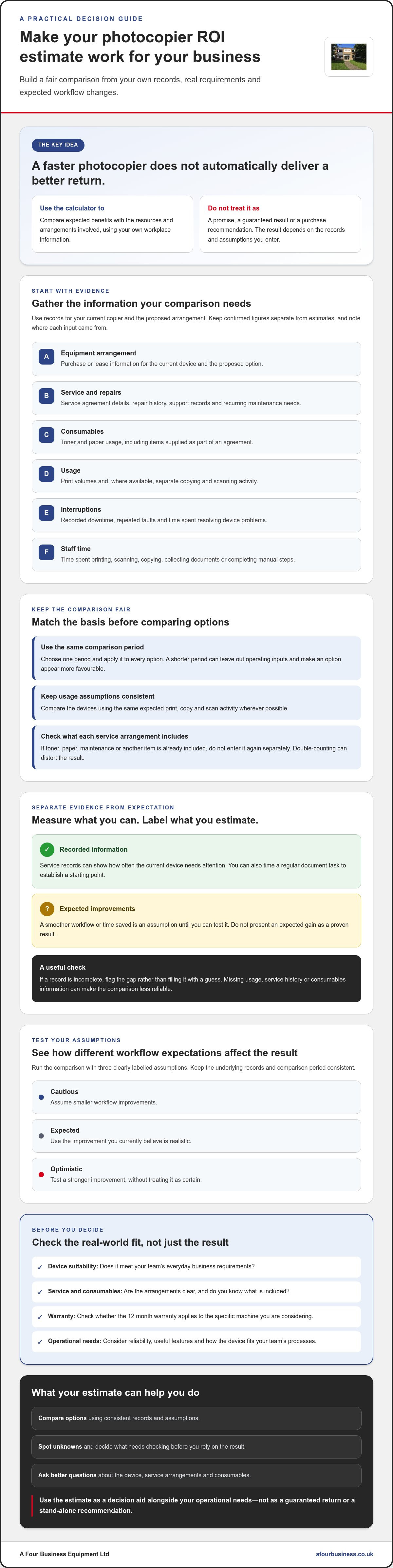
Choose one comparison period, such as the proposed agreement term, and use it for every option. Separate benefits you can measure from those you expect to see. For example, service records may show how often your current device needs attention, while a smoother workflow may be an assumption until you test it. Do not treat both as proven gains.
Financial return is only part of the decision. Reliability, useful features and fit with your team’s processes can matter even if they are difficult to express as a figure. A device that looks favourable in a calculation may still be unsuitable if it does not meet everyday business requirements.
When is a calculator useful, and when is it not?
Use a calculator to organise information before comparing devices or speaking with a supplier. It helps you see which details are known, which are estimates and what still needs checking. For a broader view of ownership inputs over time, see this explanation of Total Cost of Ownership (TCO).
Gaps in your records can skew the comparison. Missing print volumes, service history or toner and paper usage make the result less reliable. So can optimistic assumptions about time saved. Mark estimates clearly and check how the result changes if expected improvements are smaller than you hoped.
Do not treat one ROI percentage or payback date as a purchase recommendation. Use it alongside your operational needs and questions about the proposed device, service arrangements and consumables. A clear calculation supports a more informed conversation, but the final decision should reflect what your business actually needs.
Which figures should your office photocopier ROI calculator include?
A useful calculation starts with your own records, not a supplier’s assumptions. Gather information for your current copier and the proposed arrangement, then compare them over the same period. If one option is assessed over a shorter term, it may look more favourable simply because fewer operating inputs are counted.
Make every input in your office photocopier ROI calculator clear. Keep confirmed figures separate from estimates, and note where each figure came from. Useful records include:
Equipment arrangement: Purchase or lease information for your current device and the proposed option.
Service: Service agreement details, repair history, support records and recurring maintenance needs.
Consumables: Toner and paper usage, including items supplied as part of an agreement.
Usage: Print volumes and, where available, separate copying and scanning activity.
Interruptions: Recorded downtime, repeated faults and time spent resolving device problems.
Staff time: Time spent printing, scanning, copying, collecting documents or completing manual steps.
Record your current copier’s total ownership inputs
Start with information you can verify, such as equipment or lease records, service documents, consumables orders and available device reports. Use a consistent period for the current and proposed arrangements. Record how often your team prints, scans and copies during that period.
Check what each service agreement already covers. If toner, paper, maintenance or another item is included, do not enter it again as a separate input. Double-counting can distort the comparison and make one arrangement appear more or less favourable than it is. If a record is incomplete, flag the gap rather than filling it with a guess.
Estimate benefits without overstating them
Staff time can be useful to track, but count it only when you can make a credible before-and-after comparison. For example, record how long a regular document task takes now, then check the equivalent task using the proposed workflow. Include fewer manual steps or less device downtime only if you can explain how you will assess the change.
Label each entry as confirmed data or an estimate, and record the reason for it. If a time saving is expected but not yet measured, treat it as an assumption to test, not a guaranteed benefit. This gives you a clearer basis for comparing options and helps a supplier understand your working needs. If you are reviewing equipment and ongoing photocopier service together, A Four Business Equipment Ltd's copier equipment and service may be a useful place to continue your research.
How to compare copier options fairly with ROI and TCO
Once you have gathered your figures, compare each copier option on the same basis. TCO, or Total Cost of Ownership, brings together the inputs involved in acquiring, operating and maintaining a device over an agreed period. Looking only at the equipment can leave out service, toner, paper and the practical features your team relies on.
Use the same print volumes, comparison period and workflow assumptions for your current copier and each proposed option. Check what each service arrangement includes. An office photocopier ROI calculator can organise the comparison, but it is only fair if each option accounts for the same things.
Build a like-for-like comparison table
Create a column for your current device and one for every option you are considering. Keep entries simple. If you cannot confirm a detail, mark it as “not known” instead of filling the gap with an assumption.
Arrangement: Acquisition or lease agreement details for the same comparison period.
Service and consumables: What support, toner and paper are included, and what your business provides separately.
Usage and uptime: Expected print activity, service needs and the availability your office requires.
Useful features: Functions that address a real task, such as a regular scanning or document-handling need.
Count a feature as a benefit only if your team will use it. A scanning function may be valuable if it removes a manual step in a frequent process, but less relevant if the task is rare. Record why an option matters to your workflow, not just that it appears on a specification sheet. For a closer look at lease arrangements, read the office copier leasing guide.
Compare new and refurbished photocopiers in context
Neither a new multifunctional copier nor a used photocopier is automatically the right choice for every office. Assess each against your expected document volume, day-to-day tasks and available support. For a used device, ask what information is available about its condition and confirm the warranty terms for that specific machine and arrangement. Rely on the phrase 12 month warranty only after checking its eligibility and terms.
Check that the device can handle your workload and that its functions suit how your staff print, copy and scan. Include the relevant service and consumables in the same comparison so the decision reflects the whole working arrangement. The used photocopier service contracts guide can help you review what ongoing support to clarify.
How to use your calculator, test assumptions and assess the result
Run the calculation in a way that lets a colleague follow your reasoning. A clear process makes missing information easier to spot and shows which assumptions need checking before you choose a copier.
Gather your baseline: Bring together current equipment, service, toner, paper and usage records for the period you plan to assess.
Collect proposed details: Note the device, agreement and service information for each option, including what is covered and what your business would arrange separately.
Check that figures match: Use the same period, print activity and units for every option. Convert monthly and annual figures consistently before comparing them.
Enter confirmed information first: Keep recorded data separate from estimates, and write down the source of each entry.
Test three scenarios: Use your own figures to model a cautious case, an expected case and an optimistic case. Vary uncertain workflow improvements, not confirmed records.
Review the outcome together: Share the result and assumptions with the people involved in the decision. Agree what still needs verification before proceeding.
For example, you may expect a proposed process to reduce time spent handling a regular scanning task. Treat that saving as an estimate until you can measure it. Note how you will compare the task before and after a change, then review the assumption once the new arrangement is in use. Do not present projected staff-time gains as confirmed benefits in your office photocopier ROI calculator.
What should you do if the result is uncertain?
Uncertainty is a reason to investigate, not to force a conclusion. List missing records, unclear service details and unverified workflow claims. Ask the supplier to clarify information that affects your comparison, then update the calculation. If a more cautious assumption changes the result, identify which detail is driving the difference.
Use the estimate alongside practical considerations, including reliability, support and how well the device fits your office’s work. For wider ideas on managing print activity, see these office printing cost reduction strategies. If you are weighing copier options, discuss your business copier requirements with A Four Business Equipment.
Turn your office photocopier ROI estimate into a confident next step
Your calculation is a starting point for a practical conversation, not a verdict. Before asking for advice, bring together your office’s requirements, the assumptions behind your estimate and the details you still need to confirm. This helps a supplier respond to your actual workload rather than make a recommendation based on incomplete information.
What should you ask before choosing a copier?
Use your records and comparison to guide your questions. Ask the supplier to explain how the proposed device and arrangement meet your requirements. Check that the details match the information you entered into the office photocopier ROI calculator.
Which features and service arrangements are included in this specific proposal?
How does the suggested machine suit your current print volumes and planned workflows?
Which toner and paper arrangements should you account for, and what is included?
Does the stated 12 month warranty apply to this particular machine and arrangement, and what are its terms?
If an answer changes one of your assumptions, update the comparison before relying on the result. Keep unresolved points visible. Clarifying them can help you compare the proposal fairly with your current setup and any other options you are considering.
How A Four can support your copier decision
A Four Business Equipment Ltd has supplied business equipment since 1988. The company supplies new multifunctional copiers and used photocopiers, alongside photocopier service, maintenance, toner and paper. Considering the machine and its ongoing support together can help you assess whether an option fits the way your office works.
Share your business requirements, the figures you used and the questions you still have. A Four Business Equipment Ltd can discuss suitable equipment and related service and supplies without promising a particular ROI. You can also ask for clarification about the specific machine, its support arrangements and warranty terms before making a decision.
Discuss your copier requirements with A Four Business Equipment Ltd and take your calculator inputs into the conversation.
Make your copier decision with confidence
A useful office photocopier ROI calculator brings your own records, expected benefits and assumptions into one place. Compare options over the same period, include equipment, service and consumables, and test uncertain workflow gains rather than treating them as guaranteed. The result can guide your next conversation, but it should sit alongside practical questions about reliability and whether the device suits your team.
Before deciding, confirm what the proposed machine and service arrangement include, how they match your workload, and whether the 12 month warranty applies to that specific machine. A Four Business Equipment Ltd has supported business customers with equipment and photocopier service since 1988. There is also no call out charge for repair estimates.
Ready to talk through your requirements and calculator assumptions? Talk to A Four Business Equipment Ltd about the right photocopier for your business. A clear, informed conversation is a practical next step towards choosing equipment that fits the way your office works.
Frequently Asked Questions
What is an office photocopier ROI calculator?
An office photocopier ROI calculator helps you compare the expected benefits of a copier arrangement with the business inputs involved over a set period. It can bring equipment, service, consumables and measurable workflow changes into one view. The result supports your decision, but it cannot guarantee a future return. Its usefulness depends on accurate records and realistic assumptions about how the device will work in your office.
How do I calculate the ROI of an office photocopier?
Set a comparison period, then gather records for your current copier and details of the proposed arrangement. Enter comparable information for equipment, service, toner, paper and usage, and include workflow benefits only when you can explain how they will be measured. Keep confirmed figures separate from estimates. Test cautious, expected and optimistic assumptions, then review how the result changes. Do not treat a single percentage or payback date as a purchase recommendation.
Which figures should I enter into a photocopier ROI calculator?
Use your equipment or lease records, service history, toner and paper data, print volumes, downtime and recurring support needs. Include staff time spent printing, copying, scanning or resolving device interruptions only if you can measure it credibly. Check whether items are already included in an agreement so you do not count them twice. Compare current and proposed arrangements over the same period, and label estimates or missing information clearly.
Can an office copier ROI calculator compare buying and leasing?
Yes. It can help you compare buying and leasing if both options are assessed over the same period and use the same usage assumptions. Record the relevant equipment and agreement details, then include service and consumables according to what each arrangement covers. Check the terms carefully because included support may differ. The calculator can organise the comparison, but it cannot decide which arrangement suits your business or guarantee a particular result.
Does a refurbished photocopier offer a better return than a new one?
Not automatically. A used photocopier may suit your business if its condition, functions, expected use and support arrangements match your needs. A new multifunctional copier may be a better fit for a different workload or workflow. Compare both options using the same period and print assumptions, and confirm what service and consumables are included. Ask whether a 12 month warranty applies to the specific machine, and check its terms before relying on it.
How can I estimate staff time saved by a new photocopier?
Start with a repeatable task, such as scanning a regular document set, and record how long it takes with your current setup. Identify the workflow change the proposed copier is expected to make, then compare the same task afterwards. Keep the method consistent and label projected savings as estimates until measured. If staff time is difficult to track or the task varies, leave the benefit uncertain and test it rather than presenting it as confirmed.
What should I do if I do not know my current printing figures?
Start with available device reports, service records, toner and paper orders, or lease and support documents. Ask relevant colleagues or your supplier what records they can provide, and note the period each report covers. If some details remain unavailable, mark them as unknown instead of guessing. You can still compare options using confirmed information, but treat the result cautiously. Check whether different reasonable assumptions change your view before making a decision.


Comments