


How to Calculate Total Cost of Ownership for Office Printers
The printer that seems like the simplest choice today may not be the right fit over its working life. To understand how to calculate total cost of ownership for office printers, look beyond the purchase or lease figure and consider how your team actually prints.
Toner, paper, servicing, energy use and downtime can all affect the overall picture. Changing print volumes can make estimates harder to compare, too. Build your calculation from your own print records, then ask suppliers for consistent details about each option.
This guide sets out a repeatable way to compare new, refurbished, purchased and leased machines over the same period. You’ll see what information to collect, how to account for everyday use and which factors you can monitor. That gives you a practical basis for choosing equipment that suits your business, rather than relying on one figure in isolation.
Table of Contents
What total cost of ownership means for an office printer
A purchase or lease figure tells you how you acquire a printer, but not what it takes to keep it working over its useful life. Toner, paper, servicing and maintenance contribute to the total. Downtime and staff time may also be relevant if your business has reliable records to measure them.
TCO is the full expenditure involved in acquiring, operating and maintaining a device over a chosen period, not simply its upfront purchase figure. This follows the broader idea of Total cost of ownership (TCO), which considers direct and indirect expenditure. When working out how to calculate total cost of ownership for office printers, include relevant, supportable inputs rather than relying on one headline figure.
A comparison is useful only when every option is assessed over the same period and expected workload. A device evaluated over a shorter period or at a different print volume may look more suitable simply because the assumptions differ. Set those shared conditions first, then assess new, refurbished, purchased and leased equipment on the same basis.
Which printer-related expenditure belongs in a TCO calculation?
Start with the cost categories that apply to your situation. The relevant inputs depend on the equipment and the terms offered, so ask suppliers for clear, comparable information.
Acquisition or lease payments: record the purchase or lease details that apply to the period you’re assessing.
Supplies: include toner and other consumables relevant to the device, using information that matches your expected printing.
Servicing and maintenance: note what support is included and what may need to be accounted for separately.
Paper: include it only if you can estimate usage consistently across every option.
Downtime or staff time: record these separately where your business has reliable data. If you can’t verify them, don’t present an estimate as a confirmed outcome.
Why compare expenditure over the same ownership period?
Choose a period that suits your decision and the supplier information available. Apply it consistently to new and refurbished photocopiers, as well as purchased and leased options. This makes the comparison fairer and helps show where the differences come from.
Keep a note of assumptions, such as expected print volume or unverified downtime. Label them clearly instead of presenting them as known facts. If an assumption changes, you can update the comparison without confusing an estimate with confirmed supplier terms or business records.
How to calculate office printer TCO step by step
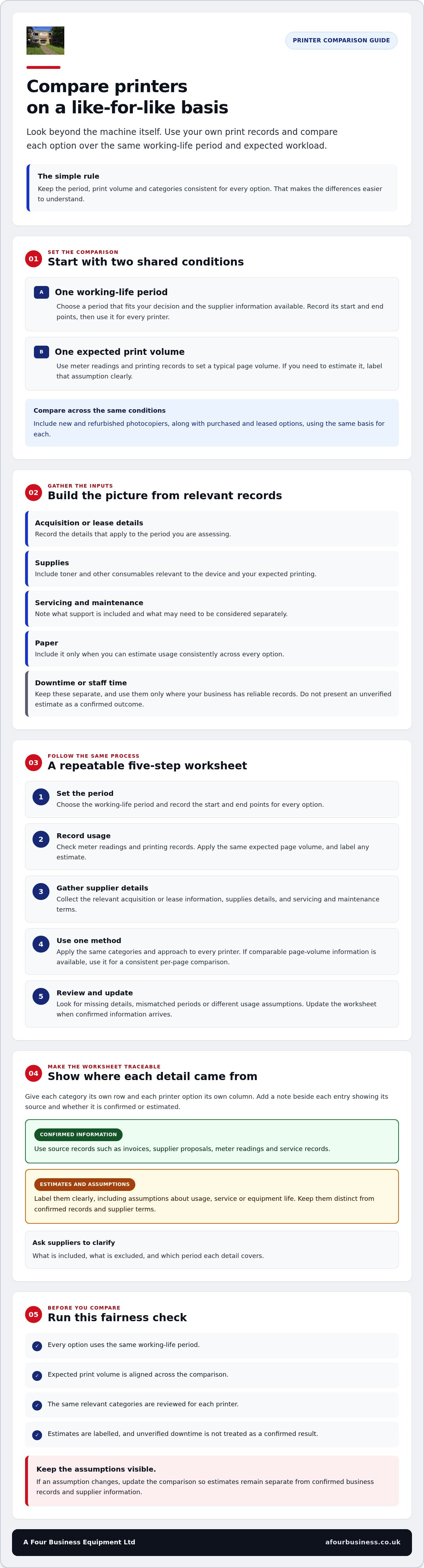
A clear worksheet makes it easier to compare options and track how each figure was estimated. Use the same evaluation period and expected print volume for every printer, then apply one method throughout. This keeps the comparison focused on your business’s requirements, rather than inconsistent supplier assumptions. Gartner’s principles of TCO also underline why procurement decisions should look beyond the initial acquisition.
1. Set the period. Choose a working-life period that fits your decision and the supplier information available. Record the start and end points, and use them for every option.
2. Record usage. Check meter readings and printing records to establish a typical page volume. Apply the same expected volume to each option. If you need to estimate, label the assumption clearly.
3. Gather the inputs. Collect the relevant acquisition or lease details, supplies information, and servicing and maintenance terms for each device.
4. Calculate consistently. Add the relevant figures for the chosen period using the same categories for each option. If comparable page-volume data is available, divide each total by the expected number of pages to create a consistent per-page comparison.
5. Review the result. Check for missing information, inconsistent periods or different usage assumptions. Update the worksheet when you receive confirmed details.
Gather the figures your business can verify
Use invoices, supplier proposals, meter readings and service records as source documents. In a simple worksheet, give each expenditure category its own row and each printer option its own column. Add a note beside each entry to show whether it’s confirmed or estimated, and where the information came from. Ask suppliers to clarify what’s included, what’s excluded and which period each figure covers.
Apply one calculation method to every printer option
Keep the arithmetic straightforward and consistent. Calculate TCO by adding your relevant acquisition or lease, supplies, servicing and maintenance figures for the chosen period. Divide that total by expected pages only if the volume information is comparable across options. Note assumptions about usage, service and equipment life alongside the result, so you can see what may change it.
This gives you a practical way to approach how to calculate total cost of ownership for office printers without presenting uncertain estimates as confirmed outcomes. A Four Business Equipment Ltd supplies new and used multifunctional copiers, as well as photocopier servicing and business printing supplies. You can find more about the company at A Four Business Equipment Ltd.
How to compare office printer TCO fairly
A fair comparison uses the same rules for every option. Set one evaluation period and one expected workload, then organise your worksheet with printer options as columns and shared TCO categories as rows. Include acquisition or lease payments, supplies, servicing and maintenance. Add paper only if you can estimate usage consistently. This layout makes missing details easier to spot and shows which assumptions are shaping the result.
For each entry, record whether the information is confirmed or estimated. A supplier’s headline figure is not a like-for-like comparison unless it covers the same period, print volume and inclusions as the other options. Ask for clarification where the terms are unclear.
Compare new, refurbished, purchased and leased equipment
Assess new and refurbished photocopiers using verified details, not the category alone. Check the condition, what servicing and supplies are included, and which warranty terms apply to the specific machine. For used equipment, used photocopier service contract guidance can help you identify contract inclusions to confirm.
For purchased and leased options, record the relevant payment schedule and any stated inclusions over your chosen period. Keep the comparison focused on those terms rather than trying to resolve every aspect of the lease versus buy decision here. Ask the provider to clarify the lease agreement, including its period and what is covered, so you can record those details consistently.
Check the per-page figure against real usage
A per-page figure can help you compare options, but only if the TCO inputs and expected page volume are supported by comparable information. Divide the relevant total for each option by the same expected number of pages. If your records and supplier details allow it, separate colour and mono volumes so a difference in print mix doesn’t distort the comparison.
Print behaviour can change. A shift in staff numbers, work patterns or document habits may make an earlier volume estimate less useful. Review meter readings and update the worksheet when your records show a different pattern. This helps you check whether the original assumptions still reflect your business.
Using a consistent approach makes how to calculate total cost of ownership for office printers more than a comparison of headline figures. You’ll have a clearer view of what’s confirmed, what still needs checking and which option best matches your workload.
How to make your office printer TCO estimate more reliable
A useful TCO estimate is based on records you can check, not a guess about how much your team might print. Start with recent meter readings, invoices and purchasing records for toner and paper. These can help establish actual usage and identify patterns, such as a change in the amount of colour printing.
Be clear about what your figures don’t cover. If you can’t verify downtime or staff time spent dealing with print issues, list these as excluded rather than adding an unsupported estimate. Do the same for future changes, such as a possible shift in staffing or working arrangements. The aim is a transparent estimate, not a promise about what will happen.
Avoid common mistakes when calculating printer TCO
Check that each option uses the same evaluation period, workload and definition of included service. A supplier estimate may cover different items or a different period, so ask for clarification before comparing it with other proposals. Keep confirmed figures separate from assumptions, and don’t treat an unverified estimate as a supplier commitment.
A lower initial commitment doesn’t, by itself, show which option is the better fit over time. Supplies, servicing and maintenance terms all affect the comparison. For broader ways to review workplace printing habits, see these practical office printing efficiency strategies.
Turn the calculation into a useful review tool
Keep your worksheet with the source documents behind each figure, including meter readings, invoices, supplier proposals and service records. When you revisit the comparison, you can trace each input and update it without rebuilding the estimate from memory.
Compare expected usage with actual meter readings and supply records from time to time, especially if your print volume, device needs or service arrangements change. Flag any category where information is missing or unclear. This gives you a practical list of questions to resolve before choosing equipment and helps you judge whether your assumptions still reflect the way your team works.
That’s the practical value of learning how to calculate total cost of ownership for office printers: you can keep the estimate grounded in your own records and refine it as your requirements change. A Four Business Equipment Ltd also supplies photocopier servicing and business printing supplies, as outlined at the company website.
Use your office printer TCO findings to choose the right support
Your TCO comparison is most useful when it reflects the way your business prints and the support each option actually includes. Workload, toner and paper requirements, servicing arrangements, equipment condition and confirmed supplier terms all help you judge whether a new or refurbished photocopier is a suitable fit. A low headline figure alone won’t tell you how well an option matches your day-to-day needs.
Before deciding, ask each provider for information based on the same print volume and evaluation period. A Four Business Equipment Ltd has supported businesses with photocopiers and business equipment since 1988. Its range includes new and used multifunctional copiers, photocopier servicing, toner and paper, which can all be relevant when assessing your requirements.
What to ask a photocopier supplier before deciding
Use your comparison worksheet to focus the conversation. Ask suppliers to clarify:
Which supplies, maintenance and service items are included in the proposal, and which are separate?
What assumptions have been made about your workload, expected print volume and the equipment’s condition?
What support is covered, and are there any limits or exclusions you should record?
Which warranty terms apply to the specific machine, and where can you check them in writing?
Clear answers make it easier to update your comparison with confirmed information, rather than relying on assumptions. If details differ between proposals, ask providers to explain the difference before weighing the options.
When to seek help with your printer comparison
It can help to speak with a business equipment provider if proposals use different assumptions, periods or service inclusions, or if you’re unsure how to compare new and refurbished photocopiers for your workload. Share the print records and questions you’ve gathered, then ask for clarification on equipment, supplies and service terms. You can decide which details belong in your calculation and which still need confirming.
If you’re seeking a repair estimate, A Four Business Equipment Ltd states there is no call out charge for repair estimates. This applies to repair estimates only, not to an equipment or TCO assessment.
Knowing how to calculate total cost of ownership for office printers gives you a sound basis for asking focused questions and comparing verified terms. The company’s website has further information about its photocopier and business equipment offering.
Make your next printer decision with confidence
A useful TCO comparison looks beyond the purchase or lease figure. Use the same evaluation period and print volume for each option, and base your estimate on records and supplier terms you can verify. Keep assumptions visible so you can update the calculation if your workload or support needs change.
That’s the practical approach to how to calculate total cost of ownership for office printers: compare equipment, supplies and servicing together, then check which option suits the way your business works. Ask providers to clarify what’s included and confirm the terms that apply to the specific equipment, including any 12 month warranty.
A Four Business Equipment Ltd has supported businesses since 1988, supplying new and used multifunctional copiers alongside photocopier servicing, toner and paper. If you’re weighing up equipment or support options, contact A Four Business Equipment Ltd to discuss your office photocopier requirements. There’s no call out charge for repair estimates; this applies to repair estimates only.
Frequently Asked Questions
How do you calculate the total cost of ownership for an office printer?
To calculate TCO, add the relevant acquisition or lease payments, supplies, servicing and maintenance for a chosen period. Use your business’s records where possible, and apply the same period and expected print volume to every option. If you’re learning how to calculate total cost of ownership for office printers, keep estimates separate from confirmed figures so it’s clear which parts of the comparison may change.
What should be included in an office printer TCO calculation?
Include the equipment purchase or lease payments, toner and other relevant supplies, plus servicing and maintenance over the period you’re comparing. Add paper only if you can estimate its use consistently for every option. You can record downtime or staff time separately where reliable business records exist. Keep unsupported assumptions out of the confirmed figures, and note any supplier inclusions or exclusions beside the relevant entry.
How do you work out a printer’s per-page figure?
Divide the relevant total for your chosen period by the expected number of pages printed during that same period. Use the same method and comparable page volumes for every printer option. If your records and supplier information support it, separate colour and mono pages, as the print mix can affect the comparison. If the page count is uncertain or differs between options, treat the result as an estimate.
Should I include downtime when calculating printer TCO?
Include downtime as a separate consideration only when you have reliable records, such as service logs showing how often printing was interrupted and for how long. If you can’t verify its effect on your business, list downtime as excluded rather than assigning it an unsupported figure. This keeps the calculation honest while still flagging reliability as something to ask suppliers about when reviewing their service terms.
How can I compare a new printer with a refurbished photocopier?
Use the same workload and evaluation period for both, then compare confirmed details about equipment condition, supplies, servicing and support. Ask what maintenance is included and which warranty terms apply to the specific machine. Don’t assume that new or refurbished equipment automatically suits your needs better. A like-for-like worksheet helps you spot differences in the information supplied and identify what you still need to confirm.
Does printer TCO change if I lease instead of buying?
Yes. A lease agreement has a different payment structure from buying, and its terms may specify different inclusions. For a fair comparison, record the relevant payments and confirmed supplies or service provisions across the same period used for the purchased option. Ask the provider to clarify what’s included, what’s separate and whether any assumptions have been made, rather than comparing a lease figure with a purchase figure alone.
How often should a business review its office printer TCO?
Review your estimate when you’re considering new equipment and whenever print volume, device requirements or service arrangements change. You can also check it periodically against current meter readings, supply records and service information to see whether its assumptions still match your business. Keep the worksheet with its source documents so you can update the figures and understand what has changed since your last comparison.


Comments