


New Office Photocopier Business Case: 2026 Buying Guide
What if the strongest case for a new office copier isn’t a longer list of features, but the work your current machine is holding up? If staff wait for prints, repeat jobs or work around faults, those everyday interruptions can help you build a business case for a new office copier. Start with what’s happening in your workplace rather than relying on general frustrations.
This guide explains how to gather useful evidence about copier use, recurring problems and their effect on daily workflows. You’ll then compare keeping and servicing your current equipment with choosing a refurbished or new machine. The aim is a practical recommendation that reflects your organisation’s needs.
You’ll also learn how to assess functions and support, from print and scanning requirements to servicing and consumables. Focus on what staff actually need, and check the details of each proposed machine before making a decision. By the end, you’ll have a clear way to present your options and agree sensible next steps.
Table of Contents
When does a business case for a new office copier make sense?
Replacing office equipment needs a clear operational reason. A business case for a new office copier links what your team needs from the machine to wider business priorities, using evidence rather than assumptions. That might mean keeping documents moving, reducing repeated handling or ensuring the copier supports the work staff do now.
A modern copier can combine several everyday tasks in one device. For a brief overview of how photocopiers developed into multifunction equipment, see this guide to the modern multifunction photocopier. The decision to replace your own machine, though, should come from your office’s experience.
What signs show your current copier may no longer fit?
Look for repeated disruption, output that doesn’t meet your needs, changing workloads or workflows that have become awkward. Record what happened and how it affected a task, deadline or document process. For example, note whether staff had to repeat a job, handle a document in extra stages or wait before continuing.
Track scanning, copying, printing and faxing needs too. Separate recurring issues from isolated incidents before recommending a replacement. A single problem may call for attention or servicing; a pattern could point to a mismatch between the machine and the work.
Which teams and workflows depend on the copier?
Ask staff which document tasks take extra steps or create avoidable hand-offs. Identify the teams involved, the types of documents they handle and periods of peak demand, using internal records where available. This helps show whether an issue affects an occasional task or a workflow that several people rely on.
Also flag accessibility, confidentiality and workflow needs for decision-makers to assess. These may affect which functions or arrangements you consider, but check how staff work before assuming a particular feature is required.
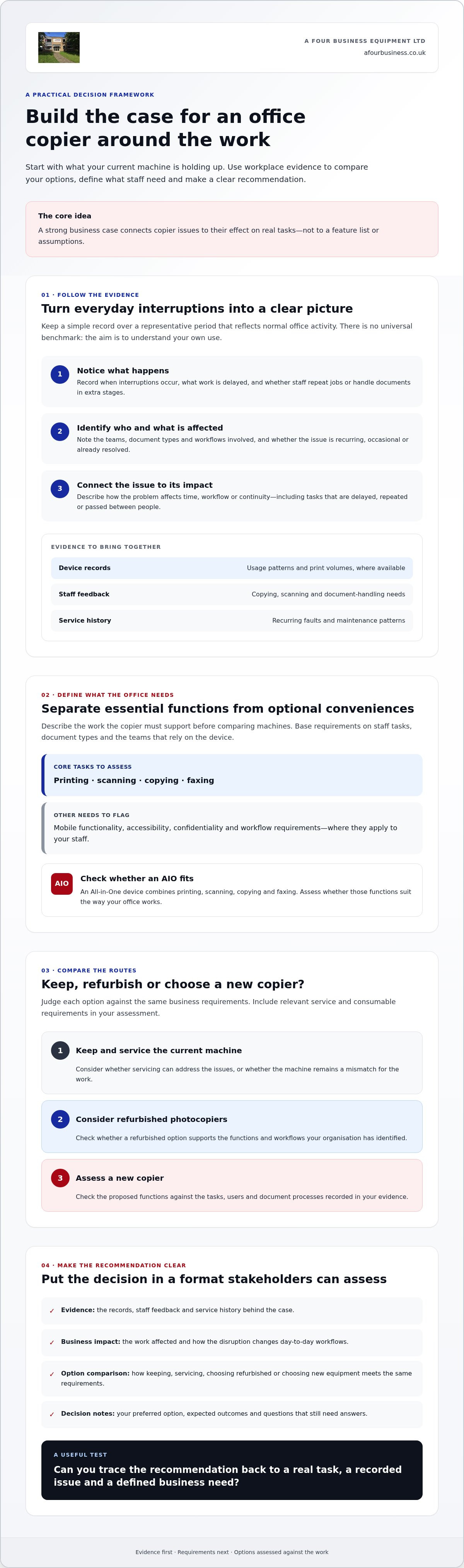
Keep a simple record over a representative period that reflects normal office activity. There’s no universal benchmark to meet; the aim is to capture a fair picture of your own use. You might log:
When interruptions occur and what work is delayed.
Whether output, scanning or document handling needs extra steps.
Which teams and document types are affected.
Whether the issue is recurring, occasional or already resolved.
These notes give you a grounded starting point for comparing options. They also keep the discussion focused on what the business needs, rather than replacing a copier simply because it’s old or choosing features without a clear purpose.
Build the business case with evidence from your office
Once you’ve identified where the copier is getting in the way, turn your observations into a clear decision process. A strong case connects recorded office needs to a defined business outcome. Keep the reasoning specific to your organisation, and avoid promising improvements you haven’t confirmed.
Work through these steps:
Gather evidence: Review available print volumes, usage patterns and service records for the relevant devices. Add staff feedback about copying, scanning and document handling.
Identify the impact: Describe how interruptions affect time, workflow or continuity. Note which tasks are delayed, repeated or passed between people.
Define needs: Record the output types, user groups and functions the copier must support, including any required mobile functionality.
Assess options: Compare a new copier with keeping or servicing the existing machine, or considering a refurbished option. Judge each route against the same business requirements.
Compare costs: Gather comparable information for each option. Ask what the purchase or lease arrangement includes, and account for relevant service and consumable requirements. Make clear which figures are confirmed and which still need checking.
Document the decision: Summarise your evidence, preferred option, expected outcomes and questions that still need answers.
What information should you gather before proposing a copier?
Start with records you already have. Check device usage and print volumes where available, then review service history for recurring faults or maintenance patterns. Ask staff which tasks take extra steps. For example, a team may need to scan documents separately before sharing them, or change how it handles particular output.
Capture the practical details too. Which teams use the machine? What kinds of documents do they produce? Do staff need mobile functionality? A clear record helps you explain what a proposed copier must do, rather than relying on a general request for something newer.
For a fair cost comparison, ask for the same information about each option. Separate the equipment cost from any service arrangements and the toner and paper requirements relevant to your expected use. If you’re considering a lease, compare the terms with the costs and responsibilities involved in buying. Don’t treat an estimate as a confirmed total until you’ve checked what it includes.
How can you explain operational benefits clearly?
Connect each issue to a specific workflow or business requirement. If a document task is repeatedly interrupted, describe the knock-on effect on that task and the people who depend on it. If workloads have changed, show how the current device’s use differs from what the team needs now.
Be measured. Separate expected improvements, such as fewer steps in a documented workflow, from outcomes that need supplier confirmation, such as whether a particular machine can support a required process. Use your own records, not unsupported productivity promises or broad industry claims. Harvard Business School Online’s guidance on how to assess the merits of a decision can help you organise the reasoning without overstating what the evidence shows.
For a practical discussion about matching copier options to your recorded requirements, you can talk through your copier needs with A Four Business Equipment Ltd.
New copier, keep the current machine or choose refurbished?
There are three practical routes to compare: keep and service the copier you have, choose refurbished photocopiers, or consider a new machine. The right choice depends on your documented requirements and the evidence available, not on age alone. A newer model isn’t automatically the best answer if your current device still supports the work reliably.
Use the same questions to assess each option. That makes the comparison fair and helps decision-makers understand the trade-offs.
Keep and service your current machine: Does it still meet your output and workflow needs? Review its service history and ask whether recurring issues can be addressed. Consider how servicing would fit around normal work.
Choose refurbished photocopiers: Does the available machine have the functions your teams require? Ask for clear condition information and details of applicable support and warranty terms. Check what the changeover involves and whether it could affect daily work.
Consider a new copier: Does a new machine better match your recorded workload or required functions? Confirm the specifications and support arrangements for the specific machine. Check any warranty terms and plan for the effect of moving staff to a different device.
For each route, note the evidence behind your view of reliability. This might include service records for your current device or condition and support information for a refurbished option. If the evidence is incomplete, record that as an open question rather than treating an assumption as fact.
When might keeping and servicing your copier be reasonable?
Keeping the machine may make sense if it still produces the output your teams need and fits their workflows. Check the service history, identify any repeated problems and ask whether those issues can be addressed. If the device remains suitable and the evidence points to manageable faults, replacement may not be necessary. Don’t recommend a change just because a newer model is available.
When should you compare new and refurbished photocopiers?
Compare both when your current machine no longer fits the documented requirements, or when its reliability evidence leaves important questions unanswered. Look at required functions, available condition information, support and your priorities for replacing the device. For a refurbished option, review service contracts for used photocopiers and confirm what support applies to the machine you’re considering.
The copier itself is only part of the picture. Review the steps staff take to print and handle documents, as a change to the process may address some workflow issues without replacing equipment. Consider whether clearer print procedures or better use of existing functions could help your team work more smoothly.
Set out the evidence, requirements and uncertainties side by side. That gives your business case for a new office copier a balanced comparison, including a clear reason if the best decision is to keep the current machine.
Which copier features and support should your business assess?
Use your recorded workflows to separate must-have functions from useful extras. A feature belongs on the essential list only if it supports a task your team actually carries out. This keeps your business case for a new office copier focused on work requirements, rather than specifications that sound appealing but may go unused.
Which functions should you match to everyday tasks?
Start with the basics: printing, scanning, copying and, if your team needs it, faxing. An AIO is an All-in-One device that combines these functions in a single unit. Check which functions are needed, who will use them and how documents move through the office.
Then assess features against specific tasks:
Mobile functionality: Ask whether staff need to print or manage jobs from mobile devices, then confirm compatibility with the devices and systems your business uses.
Solution platform: Consider whether your workflows need software that brings office functions together, and check that it works with the proposed copier and your existing setup.
intelligent media sensor: If your work involves different media types, ask whether the proposed machine includes this feature and how it handles the materials you use.
double feed detection: If staff regularly scan multi-page documents, check whether this is available and suitable for your workflow.
A high capacity dual scan feeder holds many sheets and scans both sides automatically, helping with workflows that involve larger two-sided documents. Confirm whether the specific machine includes one; don’t assume it’s part of the specification.
What should you ask about delivery, installation and support?
Ask what delivery and installation include for the proposed machine, and how the changeover will be handled. Clarify how copier servicing, consumables and ongoing support are arranged, including who to contact if the machine needs attention. Ask the supplier to explain these practical details in relation to your business requirements.
Before making a recommendation, check the machine’s current specifications and compatibility with your workflow. Confirm any warranty terms and whether they apply to the specific copier being proposed. If you’re also weighing a lease agreement, review the available leasing options for office copiers as part of that separate decision.
For a personal discussion about matching copier functions and ongoing support to your needs, speak with A Four Business Equipment Ltd about copier options.
Present your copier recommendation and agree the next steps
Bring the evidence together in a short recommendation that decision-makers can review quickly. A clear business case for a new office copier should explain the problem, who it affects and why your preferred option fits better than the alternatives. Keep facts, expectations and unanswered questions distinct so nobody mistakes an assumption for a confirmed specification or outcome.
What belongs in a concise copier recommendation?
Start with the current business problem, then summarise what you found in device records, service history and staff feedback. Name the affected teams and workflows, such as document scanning that requires extra handling or printing tasks disrupted by recurring faults. Connect each issue to a practical business need, rather than relying on general claims about productivity.
Next, set out your requirements and preferred route. A short recommendation might cover:
Documented need: The issue and the evidence supporting it.
Required functions: The tasks the machine must support, based on actual workflows.
Support expectations: What you need to know about servicing, consumables, delivery and installation.
Cost comparison: The information gathered for buying, leasing or keeping the current machine, with any assumptions clearly labelled.
Preferred option: Why keeping the current machine, choosing refurbished or selecting new best meets those requirements.
Open questions: Any specifications, compatibility details, support arrangements or warranty terms still to confirm.
Explain the trade-offs honestly. Your selected route may be the best fit because it addresses a documented workflow need, while another option may leave a recurring issue unresolved. If the evidence doesn’t yet support a firm decision, say what information is missing and who will obtain it.
How can a supplier conversation help confirm the decision?
Share your recorded workflows and requirements with a supplier, then ask which proposed machine specifications meet them. For example, if staff need to scan particular document types or use mobile functionality, ask the supplier to confirm compatibility for the specific equipment being considered. Request clarification in writing where it will help stakeholders review the recommendation.
A Four Business Equipment Ltd supplies new and used multifunctional copiers and offers photocopier servicing, toners and paper. Ask what the proposed arrangement includes, how servicing is handled and which consumables are suitable. Confirm the specifications and compatibility of the specific machine, along with any applicable warranty terms.
Once those details are confirmed, update your recommendation and agree who will take each next step. To discuss your requirements, discuss your business copier requirements with A Four.
Make your next copier decision with confidence
A strong business case for a new office copier starts with evidence from your own workplace. Use device records, service history and staff feedback to show how current equipment affects daily tasks, then compare keeping it, choosing refurbished photocopiers or selecting a new machine against the same requirements.
Before recommending a model, confirm that its functions suit your workflows and check the details that matter after installation, including support arrangements, servicing and consumables. A Four Business Equipment Ltd supplies copiers alongside photocopier servicing, toners and paper, supporting businesses with their office document equipment needs.
If you’re ready to discuss your documented requirements, talk to A Four about your business copier needs. Use the conversation to check outstanding details and strengthen your recommendation for stakeholders. You’ll be better placed to choose an option that fits the work your team actually does.
Frequently Asked Questions
What should a business case for a new office copier include?
It should explain the business need, the evidence behind it and why your preferred option fits. Include relevant device records, service history and staff feedback, then describe affected workflows and the functions required. Compare keeping and servicing your current copier with refurbished photocopiers and a new machine. Note details still to confirm, such as specifications, compatibility, delivery and installation, costs or warranty terms.
When should a business replace its office copier?
Consider replacement when evidence shows the copier no longer meets your output or workflow needs, or recurring faults disrupt work and can’t be resolved in a suitable way. Record what happens and how it affects staff tasks, document handling or deadlines. Don’t use age alone as the reason to replace a machine. Check its service history and whether servicing could address the issues before recommending a change.
Is a new copier better than a refurbished photocopier?
Not automatically. The better fit depends on your required functions, workflow, reliability evidence and support needs. A new copier may suit changed requirements, whilst refurbished photocopiers could be worth considering if a suitable machine meets your needs and its condition and support arrangements are clear. Compare both options with keeping and servicing your current device. Ask for the proposed machine’s specifications and applicable warranty terms before making a decision.
How do I show that a new copier will improve office productivity?
Use evidence from your own workplace rather than making broad promises. Record tasks delayed by faults, repeated jobs, extra document-handling steps and staff feedback about copying or scanning. Link each issue to a workflow requirement, then describe the improvement you expect if that requirement is met. Keep expected outcomes separate from claims that need supplier confirmation, such as a machine’s compatibility or ability to support a particular process.
What features should I look for in a new office copier?
Start with the tasks your team needs to complete. Check printing, scanning, copying and faxing requirements, then decide whether mobile functionality or a solution platform is needed. An AIO combines printing, scanning, copying and faxing in one device. If staff scan multi-page documents, ask whether a high capacity dual scan feeder is included. Confirm that any feature you select is available on the specific machine and suits your workflow.
What should I ask a copier supplier before choosing a machine?
Share your document workflows and ask which machine specifications meet them. Check compatibility with your existing setup, what delivery and installation include, how servicing and consumables are arranged, and who to contact for support. Ask for confirmation of the proposed machine’s warranty terms and whether they apply. If a detail is still uncertain, request a clear answer before presenting the final recommendation to stakeholders.
Can an office copier business case include service and support?
Yes. Support affects whether a copier can continue to meet business needs, so include your expectations for servicing, consumables, delivery and installation. Ask what arrangements apply to the specific machine and record any confirmed terms. A Four Business Equipment Ltd supplies new and used multifunctional copiers, photocopier service, toners and paper. Confirm the details relevant to your proposed equipment directly with the supplier.


Comments