


Hidden Costs of Cheap Office Printers: The True Price in 2026
The cheapest piece of equipment in your office is often the one quietly draining your monthly operational budget. You probably bought a compact desktop machine thinking you had secured a sensible bargain, only to find yourself constantly replacing thirsty cartridges, clearing awkward paper jams, and dealing with sluggish speeds. You aren't alone in that frustration. The real hidden costs of cheap office printers frequently turn an initial saving into an ongoing drain on your team's time, patience, and resources.
It's easy to see why so many businesses fall into this trap, as retail models look deceptively economical out of the box. In this guide, you will discover the unseen expenses behind entry-level desktop units and learn how to manage your long-term printing costs effectively. We'll walk you through the true total cost of ownership, explore why cheap devices fail during critical workflows, and show you how dependable, commercial-grade document solutions can keep your office running smoothly.
Table of Contents
The False Economy of Budget Office Printing
Picking up a budget desktop printer from a retail shelf often feels like an easy win for a growing company. On paper, it looks like an immediate bargain that solves your document needs without touching capital reserves. Yet this initial receipt rarely reflects what your company actually ends up spending over time. The real hidden costs of cheap office printers quickly surface once multiple staff members start queuing up documents, exposing a significant gap between domestic build quality and workplace reality.
Retail Printers vs Commercial Workplace Demands
Consumer printers are engineered for light, occasional use, like printing household forms or school projects. In contrast, an active office environment demands hundreds of pages a week, often submitted concurrently from several desks. When a small team pushes heavy workloads through consumer-grade plastic gearing and delicate feed rollers, parts deteriorate quickly. Paper misfeeds become a daily routine, print queues freeze, and fragile moving parts fail well before their time. Running high-paced office tasks through domestic hardware simply invites constant frustration.
Understanding Total Cost of Ownership (TCO)
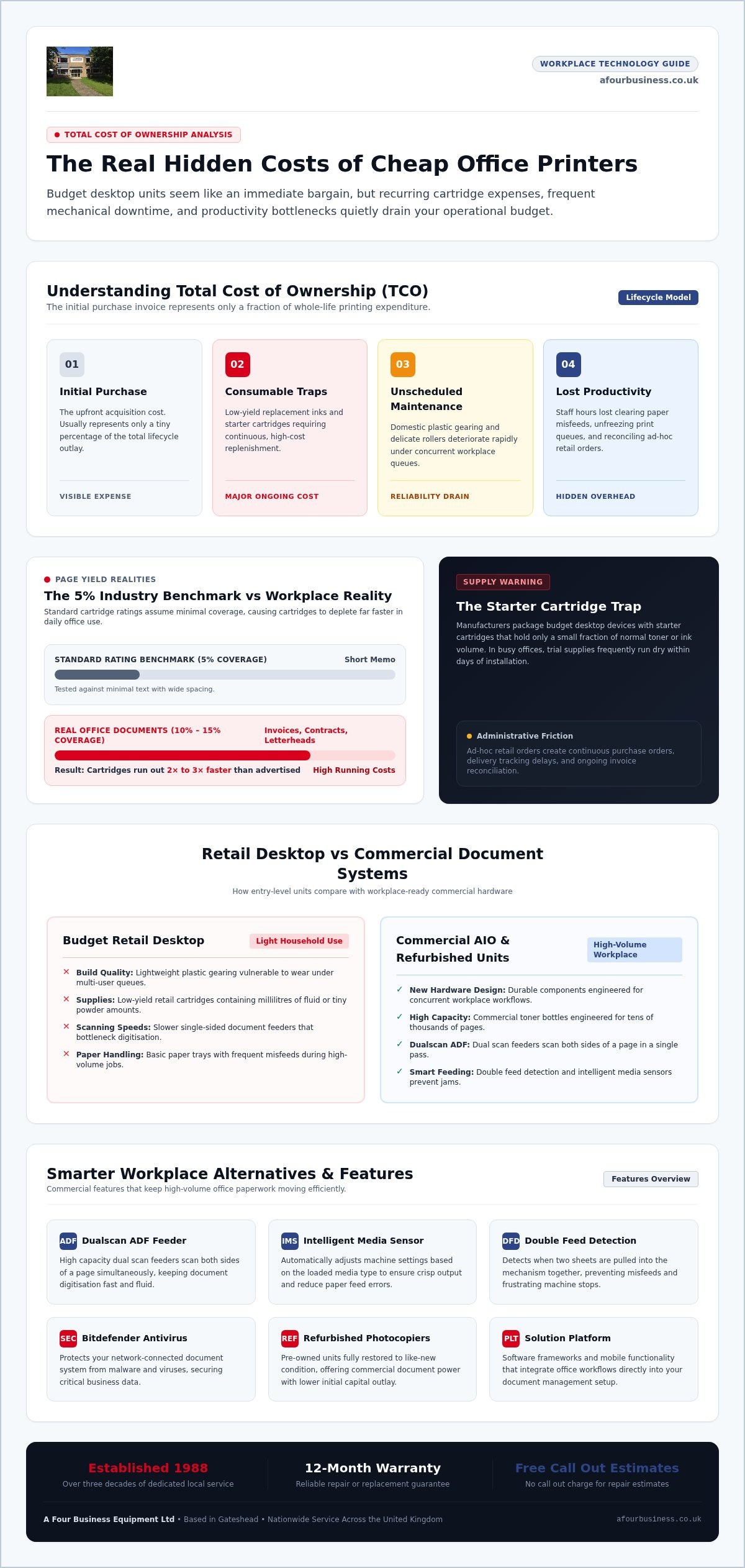
To see the complete financial picture, smart managers evaluate Total Cost of Ownership (TCO) rather than looking solely at the purchase invoice. TCO accounts for the complete lifetime investment needed to keep a machine functioning smoothly, which typically splits into four critical areas:
Initial purchase expense
Ongoing consumable supplies, including inks, toners, and paper
Unscheduled maintenance, servicing, and replacement parts
Lost staff hours caused by equipment downtime
The original acquisition expense usually represents only a tiny percentage of the total lifecycle outlay. When you look beyond retail stickers, you avoid the trap where cheap desktop units demand continuous spending on low-yield cartridges and sudden replacements. Factoring in whole-life expenses protects your operating budget and guides you toward practical, sustainable document equipment.
Consumable Traps: Why Cheap Printers Cost More Every Month
The consumer printer market operates on an age-old razor-and-blade model. Manufacturers sell desktop hardware at minimal margins, knowing they will recoup their investment many times over through replacement consumables. Once a budget printer joins your network, you are locked into proprietary supplies that carry exceptionally high running costs. These recurring cartridge bills represent one of the most punishing hidden costs of cheap office printers, quietly eroding operational budgets month after month.
The Reality of Starter Cartridges and Page Yields
When you unbox a new budget printer, the supplied cartridges are rarely full. Manufacturers package these units with so-called starter cartridges that hold only a fraction of normal ink or toner volume. In an active workplace, these trial supplies can run dry within a matter of days.
Standard yield figures printed on consumable packaging can also be misleading. Ratings are calculated using an industry benchmark of just five per cent page coverage, roughly equivalent to a short, double-spaced memo. Real office documents look quite different. Daily contracts, dense invoices, spreadsheets, and branded company letterheads routinely exceed ten to fifteen per cent coverage. This means your cartridges often run out two to three times faster than advertised, catching staff off guard and halting administrative work unexpectedly.
Retail Cartridge Prices vs Managed Toners
Buying replacement cartridges through retail channels creates unnecessary friction. Standard desktop cartridges hold millilitres of fluid or tiny amounts of powder, forcing frequent reordering. In contrast, commercial document systems rely on high-capacity toner bottles designed to handle tens of thousands of pages before needing replacement. According to independent industry research, unmanaged desktop printing leads to substantial administrative waste alongside erratic supply expenses.
Every ad-hoc retail order generates purchase orders, delivery tracking, and invoice reconciliation for your accounts team. You can discover smarter ways to streamline these recurring overheads in our guide on office printing cost reduction. Partnering with a trusted document supplier ensures your supplies arrive automatically as you need them, cutting down admin time and eliminating the constant threat of empty trays.
Unseen Costs: Downtime, Maintenance, and Lost Productivity
When a desktop printer grinds to a halt ten minutes before an urgent dispatch or tender deadline, the panic across the office is palpable. Valuable staff members end up gathered around a tiny machine, wrestling with stuck paper and toner-stained fingers instead of focusing on their actual work. Lost working hours and disrupted schedules form another major layer in the hidden costs of cheap office printers, steadily eating away at your company's daily output.
Mechanical Reliability and Frequent Paper Jams
Domestic printers rely on lightweight rubber rollers, fragile plastic cogs, and narrow paper paths that struggle under steady office traffic. As soft rollers wear down, they lose their grip, causing skewed sheets and frequent internal blockages. Commercial office systems solve this problem through purposeful engineering, incorporating features like double feed detection. This technology spots when two sheets enter the transport mechanism together, instantly stopping the feed before a stubborn jam can stall your team.
The Disposable Hardware Dilemma
Most budget desktop printers are manufactured as disposable consumer goods. When an internal gear snaps or an error code locks the screen, sourcing spare parts is practically impossible, and finding someone to fix the unit rarely makes economic sense. Offices often find themselves chucking units into storage cupboards or waste skips after just a few months of use, only to buy another cheap replacement and repeat the cycle.
Moving away from disposable hardware changes that dynamic entirely. Commercial-grade document systems are built for long-term serviceability and come supported by a 12 month warranty for genuine peace of mind. Instead of wasting hours on hold with distant call centres, working with an experienced partner gives you direct access to local engineers who know your setup personally. Selecting a provider that offers no call out charge for repair estimates ensures you receive clear, sensible advice whenever hardware needs attention, keeping your workplace running smoothly.
Workflow Bottlenecks and Security Vulnerabilities in Cheap Devices
Document management goes far beyond putting ink on paper. Modern teams rely on fast scanning, secure digital filing, and safe network handling to keep administrative operations moving. Unfortunately, desktop models bought off the shelf are rarely equipped for these demands. These operational snags and compliance blind spots represent serious hidden costs of cheap office printers, exposing your organisation to lost billable hours and digital security exposures.
Scanning and Paper Handling Inefficiencies
Most entry-level desktop printers feature flatbed glass or basic automatic feeders that process pages slowly, often scanning one side at a time. If an employee needs to digitise a stack of double-sided customer agreements or financial statements, they must stand over the glass, manually flipping sheets. This slow, clunky routine wastes valuable time that should be spent on core client work.
Commercial hardware eliminates this friction entirely. Equipping your office with a dualscan ADF lets your team process both sides of a page in a single pass. Paired with a high capacity dual scan feeder, the machine breezes through tall stacks of mixed documents in seconds. Advanced systems also feature an intelligent media sensor to detect paper thickness automatically. This prevents feed errors before they happen, making daily paperwork digitisation straightforward and reliable.
Office Network Security and Data Compliance
Cheap desktop printers regularly escape proper IT supervision. Many connect to Wi-Fi networks using factory passwords and basic firmware that never gets patched, leaving an unsecured entry point on your corporate network. A 2024 report found that 67% of organisations experienced a print-related data loss in the past year, highlighting how dangerous unmonitored devices can be.
Physical confidentiality poses just as large a risk as digital intrusion. When someone hits print on an unmanaged desktop device, sensitive payroll summaries, disciplinary notes, or client contracts sit exposed in the open tray until collected. Commercial multifunctional systems protect your documents from both sides of this equation:
Integrated Bitdefender Antivirus software to inspect incoming print data and shield against malware
User release PIN codes or swipe authentication to ensure papers only print when the user stands directly at the tray
Encrypted internal drives that safeguard scanned files during transmission
Protecting your company data doesn't require complex corporate infrastructure. To upgrade your office with reliable hardware that protects your network, contact our team for honest advice on finding the right document solution.
Smarter Workplace Alternatives: Commercial MFPs and Refurbished Units
Breaking free from disposable office hardware doesn't mean your business has to overstretch its capital reserves. Replacing a cluster of erratic desktop gadgets with a central multifunctional copiers (AIO) setup instantly eliminates desktop clutter while cutting administrative friction. Making the switch allows you to sidestep the hidden costs of cheap office printers, giving your team dependable performance, predictable running overheads, and professional output quality every day.
Refurbished Photocopiers: Premium Performance on a Sensible Budget
Upgrading to commercial equipment doesn't require purchasing brand-new hardware fresh from the factory. High-grade refurbished photocopiers offer an exceptionally sensible middle ground for growing companies. These machines are commercial workhorses that have been fully inspected, serviced, and restored to top operating standards by experienced technicians.
Choosing refurbished devices delivers substantial advantages beyond financial prudence:
Substantial reductions in equipment expenditure compared to brand-new units
Durable, heavy-duty chassis and internal gearing built to handle demanding office workloads
A positive environmental impact that keeps perfectly viable electronics out of UK waste streams
Complete operational confidence backed by a 12 month warranty
You can learn more about securing ongoing maintenance for pre-owned equipment in our guide to service contracts for used photocopiers.
Structured Support and Dedicated Service Agreements
The true peace of mind that comes with commercial machinery lies in how it is maintained. When you acquire document hardware through a structured lease agreement or purchase plan, you gain access to full support that covers expert delivery and installation right out of the gate. Rather than fumbling with network drivers or confusing connection settings, your machine arrives configured correctly for your staff from day one.
Ongoing care makes all the difference over time. Instead of struggling through impersonal manufacturer call centres or dealing with anonymous ticketing portals, partner with an established UK provider offering genuine local service. At A Four Business Equipment Ltd, we have supported UK businesses since 1988 with dependable document equipment, reliable toners, and friendly technical care. Our engineers know our customers by their names, not an account number, ensuring your office always has a friendly, knowledgeable expert ready to help keep your business moving forward.
Take Control of Your Office Document Costs
Relying on disposable desktop printers might feel like an easy shortcut, but recurring cartridge expenses, disruptive hardware jams, and compliance gaps quickly turn that initial bargain into an operational burden. Understanding the hidden costs of cheap office printers allows you to step back, look at the whole picture, and make sensible choices that protect your daily team productivity.
You don't have to navigate document management alone. Since 1988, A Four Business Equipment Ltd has provided straightforward guidance and dependable commercial equipment to workplaces across the UK. Every machine comes backed by a 12 month warranty, and we deliver transparent service with no call out charge for repair estimates. When you are ready to eliminate printing headaches and bring predictable stability to your workplace, speak with our friendly team at A Four Business Equipment Ltd to discover dependable, cost-effective document solutions tailored to your team.
Frequently Asked Questions
Why do cheap office printers use ink and toner so quickly?
Cheap office printers use small, low-capacity cartridges that hold very little fluid or dry toner powder. Retail manufacturers design these units for occasional home printing rather than continuous business output. Standard page yield ratings assume only five per cent coverage, which typical multi-page contracts and spreadsheets easily exceed. These rapid consumable depletion cycles represent one of the major hidden costs of cheap office printers, forcing frequent replacements.
Is it cheaper to repair a budget office printer or replace it?
It is almost always cheaper to replace a budget desktop unit than to fix it. Manufacturers intentionally build consumer desktop devices with sealed, non-serviceable plastic housings and rarely stock replacement gears or logic boards. Technicians cannot easily source parts, making labour and components uneconomical compared to the retail purchase price. This disposable build philosophy leads to repeated equipment waste whenever a minor fault occurs.
How does a commercial multifunctional copier lower printing costs?
A commercial multifunctional copier lowers running expenses by using high-yield commercial toner bottles and heavy-duty components that drastically reduce the cost per printed sheet. Centralising multiple office functions into a single system eliminates the need to buy supplies for numerous desktop devices. Combined maintenance agreements bundle toner, parts, and servicing together, giving your business stable monthly outlays without unexpected consumable spikes.
What is the real difference between retail and commercial paper capacity?
Retail printers generally feature small open trays holding 100 to 250 sheets, whereas commercial systems house multiple enclosed cassettes holding thousands of pages. Smaller trays demand constant reloading throughout the working day, wasting staff hours and exposing loose paper to ambient office moisture that causes curling and jams. Dedicated commercial trays keep entire reams clean, dry, and ready for continuous operation without interruption.
Can an office printer create security risks for our business network?
Yes, an unmanaged office printer can expose your entire corporate network to security threats and data breaches. Budget printers often lack built-in firewalls, encryption, or security software like Bitdefender Antivirus, leaving wireless connections vulnerable to unauthorised access. They also leave printed contracts and financial records sitting openly in output trays. Unaddressed firmware flaws and exposed documents make security oversights another of the serious hidden costs of cheap office printers.
Are refurbished photocopiers reliable for busy office environments?
Yes, professionally refurbished photocopiers are exceptionally reliable because they are built from durable commercial chassis designed for high workloads. Reputable UK suppliers clean, recondition, and rigorously test every internal component before deployment. When backed by a 12 month warranty, a refurbished system delivers identical daily productivity and paper handling to a brand-new device, allowing your business to avoid disposable desktop pitfalls at a sensible investment level.
What should be included in a professional photocopier service agreement?
A professional service agreement should cover scheduled maintenance, replacement parts, toner supplies, and local engineer assistance without surprise charges. Transparent agreements clarify response standards and provide clear inspection terms, such as no call out charge for repair estimates. Choosing an established provider with decades of expertise ensures you work directly with technicians who understand your business workflows rather than dealing with impersonal off-site call centres.


Comments