


Office Printing Cost Reduction: Practical Strategies for UK Businesses in 2026
Banning colour prints or locking up the stationery cupboard won't fix your workplace budget headaches. True office printing cost reduction comes from right-sizing your equipment and encouraging sensible daily habits, not enforcing strict bans that slow your team down. You've likely watched unmonitored colour printing send supply expenses through the roof, whilst a scattered collection of small desktop printers quietly burns through expensive cartridges. Add frequent paper jams and forgotten pages piling up beside the tray, and it's easy to see why managing workplace printing feels so frustrating.
You don't have to put up with messy device breakdowns or confusing service agreements that hide extra charges. In this guide, you will discover straightforward ways to eliminate print waste, streamline hardware, and lower your workplace document expenses without disrupting essential office work. From moving towards efficient shared machines to introducing clear printing rules that staff easily adopt, here is how you can create a reliable, predictable document setup for 2026.
Table of Contents
Where Office Printing Budgets Disappear Unnoticed
Most document spending leaks out in small, regular trickles. It rarely appears as a single massive invoice. Instead, workplace budgets suffer from an accumulation of unmonitored daily habits and unmanaged hardware that quietly inflates running expenses. When you look closely at everyday workplace habits, the true scale of waste quickly becomes obvious. Walk past any office recycling bin or output tray at the end of the day, and you'll find thick stacks of uncollected printouts, abandoned draft agendas, and duplicated reports that nobody ever bothered to read.
Achieving meaningful office printing cost reduction requires finding out where these hidden drains originate. By pinpointing the everyday assumptions that drive up document volume, you can plug the gaps before they disrupt your wider monthly budget.
Unchecked Colour Printing and Single-Sided Defaults
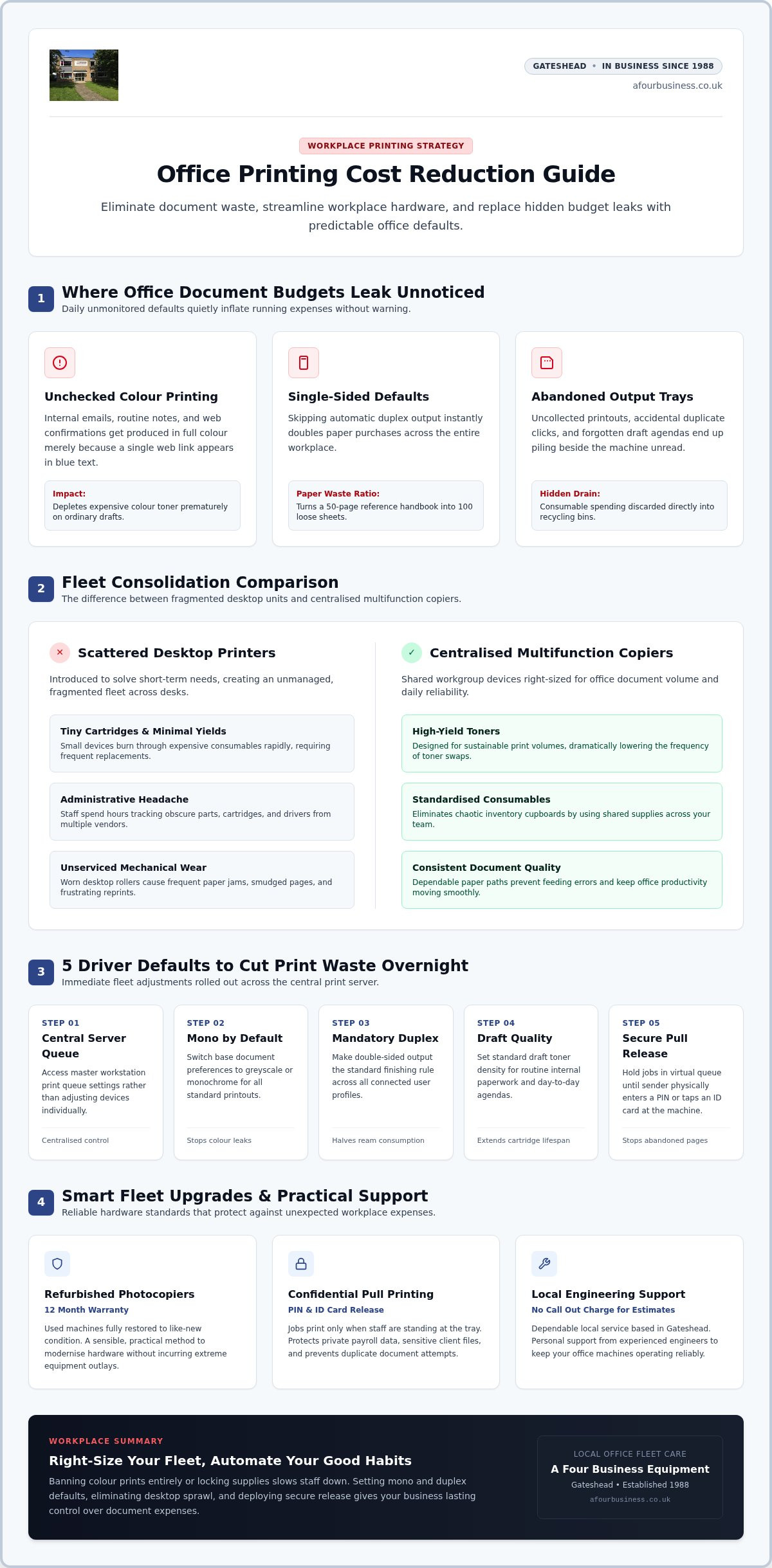
Default driver settings are often the biggest culprit. When personal computers connect to a device without strict rules in place, standard configurations default to full colour and single-sided output. This causes predictable issues:
Casual colour consumption: Internal emails, travel confirmations, and quick meeting notes get produced using full-colour toner simply because a single web link appears in blue text.
Wasted reams: Skipping automatic duplexing doubles your paper purchases instantly, turning a fifty-page reference handbook into a hundred loose sheets.
Heavy graphical coverage: Presentation slides containing dark background fills deplete expensive colour cartridges prematurely, even when clear black text on white paper would communicate the message far better.
The Hidden Expense of Scattered Desktop Printers
Desktop convenience often comes with an astonishingly poor financial return. Many offices introduce small desktop units to solve a temporary need, only to end up with a fragmented fleet of ageing hardware across multiple desks and departments. While the initial purchase price of a small printer seems harmless, the ongoing running costs tell a completely different story.
Small desktop machines carry tiny toner cartridges with minimal page yields. In contrast, larger workplace devices use high-yield toners designed for sustainable volume. Buying a continuous stream of different cartridge types creates an administrative nightmare, wasting valuable staff hours tracking down obscure parts from multiple suppliers. Inconsistent print quality from worn, unserviced desktop rollers also leads to frequent smudges, paper jams, and frustrating reprints that drag productivity down. Tackling this hardware sprawl is often the quickest path to lasting office printing cost reduction.
Immediate Fleet Adjustments to Cut Everyday Print Waste
You don't need expensive consulting projects or rigid bans to see immediate results. Simple adjustments to how your devices receive jobs can stop document budgets spiralling out of control. Setting sensible standards across your networked machines allows your team to work efficiently whilst quietly eliminating paper and toner waste in the background.
A practical programme for office printing cost reduction starts with small technical tweaks that automate good habits across your entire workplace.
Setting Fleet Defaults for Mono and Duplex Output
Establishing black-and-white double-sided printing as your default driver standard instantly slashes ongoing consumable use without requiring staff to change their daily routines. You can roll this out across your network in five straightforward steps:
Access the central print server or master workstation print queue settings.
Change the base document preference from colour to greyscale or monochrome.
Switch the default finishing rule from single-sided to two-sided (duplex) output.
Set standard draft quality for everyday internal paperwork.
Apply these preferences as the mandatory standard across all connected user profiles.
Team members can still select full colour when preparing vital client proposals. However, removing colour as the default stops unthinking clicks on internal drafts and halves total ream consumption almost overnight.
Stopping Forgotten Output with Secure Print Release
Piles of forgotten documents on exit trays are pure waste. Secure print release, often called pull-printing, holds an electronic job in a virtual queue until the sender walks to the machine and enters a PIN or taps an ID card. Documents only print when someone is physically standing there to collect them. This habit eliminates uncollected paperwork, stops accidental duplicate print jobs when someone clicks twice, and keeps confidential payroll or client records completely private.
Encouraging a Digital-First Mindset Before Printing
Simple workflow adjustments help your team rethink physical paper before hitting print. Encouraging a quick print preview catches layout mistakes, blank trailing pages, and odd spreadsheet formatting before a single sheet feeds through the rollers. Modern hardware features, like a dualscan ADF, let staff digitise incoming paper records directly to shared network folders in a single pass. Equipping staff to annotate PDF contracts on screen cuts physical distribution even further. If you need straightforward guidance on configuring your machines for maximum efficiency, talking with an experienced team providing local service can help you strike the right balance between convenience and economy.
Fleet Consolidation: Replacing Desktop Units with Multifunctional Copiers
Scattered desktop printers create an illusion of productivity. Having a small device within arm's reach feels handy for individual staff members, but maintaining half a dozen separate desktop units quietly bleeds capital out of your business every week. Consolidating these standalone units into shared multifunctional stations delivers substantial office printing cost reduction, cutting supply expenses whilst giving your workplace far more dependable equipment.
Replacing piecemeal printers with centralised floor-standing hardware removes the clutter of mismatched ink cartridges and erratic paper jams, creating a tidy, modern document hub for your entire team.
Calculating Total Cost of Ownership Across Your Fleet
Sticker prices deceive workplace buyers. A cheap retail printer looks appealing on paper, yet its true TCO quickly escalates through high cartridge replacement costs, frequent driver updates, and short machine life spans. Examining your complete expenditure reveals just how much money these small devices drain over three to four years. If you are reviewing your setup, take time to study our guide to office copier leasing to understand how consolidated equipment simplifies monthly administrative planning.
Why Centralised Multifunctional Copiers Save Workplaces Money
Combining printing, scanning, and copying into a dedicated AIO station streamlines everyday tasks. Commercial floor models offer distinct operational advantages over personal printers:
Commercial cartridge volume: Large commercial toner bottles yield thousands of impressions, avoiding the expensive tiny refills required by personal inkjets.
Hardy internal mechanics: Commercial feed assemblies handle sustained high runs without overheating, paper misfeeds, or constant roller degradation.
Reduced power draw: Running two consolidated floor hubs uses far fewer wall sockets and standby electricity than powering twelve desktop units spread across separate desks.
Positioning a shared machine in a central corridor also adds a subtle behavioural check. Staff think twice before printing personal or unnecessary multi-page drafts when collecting documents involves a quick walk into an open communal space.
The Economic Case for Quality Refurbished Photocopiers
You don't need to purchase brand-new equipment to gain commercial efficiency. Selecting reliable refurbished photocopiers allows your business to install commercial-grade print speed, high-capacity trays, and advanced scanning features without the capital outlay of brand-new machinery. Choosing professionally inspected units backed by a dependable 12 month warranty ensures complete operational peace of mind. Extending the working life of heavy-duty hardware also satisfies modern sustainability goals, keeping durable machinery producing clean paperwork for years to come.
Managing Paper, Toners, and Consumables Sensibly
Careless supply handling can quietly ruin your document budget. Even when you centralise hardware and enforce strict double-sided defaults, poor quality consumables and disorderly reordering habits trigger costly reprints and unexpected downtime. Sensible stock management is a crucial pillar of long-term office printing cost reduction. Taking control of what you feed into your copiers ensures crisp document output whilst safeguarding internal components from preventable wear.
Treating paper and toner as valuable assets rather than endless office supplies protects both your hardware and your bottom line.
Choosing the Right Paper Stock to Avoid Waste
Every paper jam wastes time and raw materials. Standard 80gsm copy paper is ideal for day-to-day office output, offering the right balance of opacity and feeding flexibility. Reserve heavier card stock and glossy media strictly for client presentations to avoid overspending on everyday filing. Moisture is the hidden enemy of smooth feeding; storing reams flat off the floor in a climate-controlled stationery cupboard stops edge curling, which is the primary cause of multi-sheet feeds.
Strategic Toner Ordering and Stock Control
Emergency courier charges and unbranded counterfeit inks wreck document budgets. Ordering authentic toners engineered specifically for your multifunctional device prevents drum scoring, powder leakage, and uneven print density. Establish a simple replenishment rule: keep one backup black toner in the cupboard, and order replacements only when the automated low-supply warning triggers. Tracking usage patterns prevents dusty stockpiles of colour bottles that expire before use. Returning depleted cartridges through structured manufacturer collection schemes keeps empty plastic units out of commercial waste streams.
Routine Cleaning and Maintenance to Prevent Reruns
Small housekeeping habits prevent large stacks of discarded paper. Wiping down the narrow slit glass with an alcohol-free optical cloth removes tiny Tipp-Ex marks and adhesive specks that cause solid black vertical lines across dozens of scanned pages. Check paper cassettes every month to confirm the side guides rest snugly against sheet edges, preventing skewed feeds.
When unexpected misfeeds occur, you shouldn't have to face expensive diagnostic fees just to find out what went wrong. You can request a free call-out repair estimate from our experienced engineers to restore flawless print reliability across your office.
Partnering with a Dedicated Service Provider for Predictable Expenses
Fixing workplace machinery only after it breaks down is an expensive gamble. Ad-hoc engineer visits, emergency call-out fees, and rush delivery charges for replacement parts can quickly wipe out any savings gained from fleet consolidation. Lasting office printing cost reduction relies on securing steady, predictable operational support. When your maintenance runs on a clear, proactive routine, your equipment stays healthy and your monthly accounts remain free from nasty surprises.
Choosing the right maintenance partner transforms your document equipment from a source of financial friction into a smooth background utility that simply works.
The Value of Transparent Service Agreements
Clarity in paperwork matters just as much as hardware performance. Many commercial suppliers lock workplaces into complex contracts riddled with ambiguous page quotas, automatic price creep, or steep early termination penalties. In contrast, an honest service agreement bundles routine preventative maintenance, genuine manufacturer parts, and expert labour into plain, straightforward terms. For a clear breakdown of terms to look out for, review our guide to service contracts for used photocopiers before signing any supplier paperwork.
A reputable maintenance team will always inspect faulty hardware and offer free call-out estimates before carrying out repair work. Knowing there is no call-out charge for repair estimates gives you total control over maintenance decisions without feeling pushed into hasty commitments.
Why Friendly Personal Support Beats Distant Call Centres
Dealing with massive, corporate leasing houses often feels impersonal. When a vital document run fails before an afternoon deadline, the last thing your team needs is sitting in a phone queue or explaining past hardware issues to an anonymous overseas call-centre operator. Personal service makes a genuine difference to office sanity. Working with seasoned engineers who visit your workplace regularly means they know your staff by name, understand your specific network layout, and recognise recurring mechanical bottlenecks instantly.
Since 1988, A Four Business Equipment Ltd has championed this service-first philosophy across the UK. Supplying both new machines and dependable refurbished photocopiers backed by a 12 month warranty, their straightforward, family-run approach ensures you receive practical technical advice without corporate jargon. By combining local expertise with reliable preventative servicing, your office achieves true document stability and long-term cost control.
Take Control of Your Workplace Printing Today
Achieving sensible office printing cost reduction doesn't mean making everyday work difficult for your staff. By locking in practical mono and duplex defaults, replacing wasteful desktop units with shared multifunctional hubs, and managing paper and toner with care, you can eliminate document waste and restore order to your workplace budget.
Reliable support makes all the difference. Since 1988, A Four Business Equipment has helped commercial offices across the UK keep document hardware running smoothly. We pride ourselves on friendly, personal service where we know our customers by name rather than an account number. Whether you want to explore dependable refurbished copiers backed by a 12 month warranty or need routine equipment maintenance with no call-out charge for repair estimates, our experienced technicians are ready to guide you.
Ready to cut unnecessary office print spend? Speak to our friendly team for honest advice and a free repair estimate today.
Frequently Asked Questions
What is the single most effective way to achieve office printing cost reduction?
Fleet consolidation combined with mandatory duplex defaults delivers the fastest results. Replacing scattered personal desktop printers with a few centrally located multifunctional copiers eliminates high-cost small cartridges instantly. Pairing this hardware change with black-and-white, double-sided driver defaults ensures your workplace stops wasting paper and colour toner on everyday internal drafts without disrupting ongoing staff workflows.
How much paper can our business save by switching to duplex printing by default?
Enforcing double-sided output as standard cuts paper ream consumption by up to half across standard office documents. Multi-page contracts, reference documents, and general meeting packs use fifty percent fewer physical sheets immediately. You will also see tidy secondary savings on office storage space, physical filing supplies, and commercial recycling collections.
Is it truly cheaper to lease a commercial copier than buy desktop inkjet printers?
Yes, because the total operating expenses of small desktop devices dwarf their initial shelf price. Personal inkjet and laser units carry tiny, low-yield cartridges that run dry quickly, resulting in exorbitant running costs per page. Commercial multifunctional machines use high-capacity toner bottles that last for thousands of prints, significantly lowering your overall operating expenses despite the regular equipment commitment.
Can refurbished photocopiers deliver the same reliability as brand-new models?
Professionally serviced machines match new equipment in daily office performance when supplied by experienced technicians. Quality used copiers undergo comprehensive bench testing, thorough cleaning, and full replacement of worn rollers and belts before delivery. Choosing units backed by a dependable 12 month warranty ensures your workplace enjoys heavy-duty document handling and scanning speed while preserving precious capital.
How does secure pull printing stop paper waste in busy shared offices?
Pull printing holds sent files in a digital queue until the user walks over to the device and authenticates with a PIN or swipe card. This stops forgotten print jobs from sitting abandoned in output trays all afternoon. It also allows staff to cancel mistaken clicks directly at the screen, preventing accidental duplicate runs before toner touches paper.
What should we look for in an office photocopier maintenance agreement?
Look for clear contract terms that bundle genuine manufacturer toners, preventative maintenance, parts, and labour without hidden minimum page penalties. Choose an established provider offering friendly personal service, transparent terms, and no call-out charge for repair estimates. Avoid suppliers who insist on restrictive multi-year auto-renewals or complex billing formulas that make budgeting unpredictable.
Does colour printing really cost significantly more than standard black and white?
Colour output uses four distinct toners (cyan, magenta, yellow, and black) instead of one, multiplying consumable usage on every single sheet. High-coverage items like graphical headers, digital signatures, and presentation slides deplete colour reservoirs rapidly. Restricting colour output strictly to final, client-facing work is essential for long-term office printing cost reduction.


Comments